SYMPTOM:
When the user adds one or more new tables through Warehouse Catalog in Strategy Developer 10.x, the error below occurs:
This key is already associated with an element of this collection
CAUSE:
One possible cause for this is that objects have been migrated from another project using Object Manager, but also tables have been brought to the project through Warehouse Catalog.
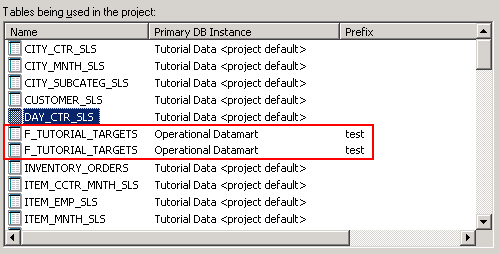
When object migrations are being performed between two projects, Warehouse Catalog should not be used to bring tables into the destination project. When a table is added to a project, a new object ID is created and that will lead to scenarios where the same table has different IDs in the source and destination project. When migrating an object, the dependent table is copied if the same ID does not exist in the destination project. As a result, there will be two tables with the same name, as shown in the screenshot above.
ACTION:
One of the duplicated tables should not be used by any project object. Please use Warehouse Catalog to remove the one table without any dependencies. When removing a table from the Warehouse Catalog (right to left), if there is any dependency, the GUI will display a warning message to remove dependency prior to removing the table.
Contact Strategy Technical Support for further assistance.
