EducationSoftwareStrategy.com
StrategyCommunity

Knowledge Base

Product

Community

Knowledge Base

TopicsBrowse ArticlesDeveloper Zone

Product

Download SoftwareProduct DocumentationSecurity Hub

Education

Tutorial VideosSolution GalleryEducation courses

Community

GuidelinesGrandmastersEvents
x_social-icon_white.svglinkedin_social-icon_white.svg
Strategy logoCommunity

© Strategy Inc. All Rights Reserved.

LegalTerms of UsePrivacy Policy
  1. Home
  2. Topics

KB33714: In MicroStrategy ScanMD, the summary page shows the fixes are performed successfully, but the errors remain unfixed.


Community Admin

• Strategy


In MicroStrategy ScanMD, after performing fixes, the summary page shows the fixes are done successfully, however, the errors remain in the metadata.
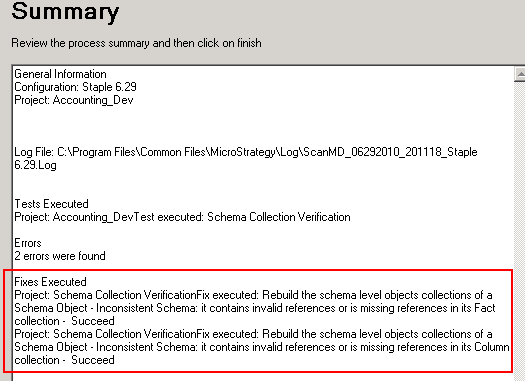
SYMPTOM:
In Strategy ScanMD, after performing fixes, the summary page shows the fixes are done successfully, however, the errors remain in the metadata.
 

ka04W000000OenlQAC_0EM440000002E2o.gif

 
CAUSE:
Though the summary page shows the fixes are done successfully, due to the schema lock, it prohibits ScanMD from performing any schema related modification. To verify this problem, the user can check DSSErrors.log file right after the ScanMD fix. The user may observe the errors below:
Sample Code/Error
2010-06-29 19:57:37.261-05:00 Schema object 'Schema' with ID '6D263FCF31D9D2E2E1B30080DBDBADD7' cannot be modified because it is in use by 'Administrator' on 'TS-VM32-WIN2K3' since 6/29/2010 7:55:17 PM. Please contact your administrator for more information.
 
ACTION:
Release the schema lock and perform the ScanMD fix again.


Comment

0 comments

Details

Knowledge Article

Published:

June 5, 2017

Last Updated:

June 5, 2017