EducationSoftwareStrategy.com
StrategyCommunity

Knowledge Base

Product

Community

Knowledge Base

TopicsBrowse ArticlesDeveloper Zone

Product

Download SoftwareProduct DocumentationSecurity Hub

Education

Tutorial VideosSolution GalleryEducation courses

Community

GuidelinesGrandmastersEvents
x_social-icon_white.svglinkedin_social-icon_white.svg
Strategy logoCommunity

© Strategy Inc. All Rights Reserved.

LegalTerms of UsePrivacy Policy
  1. Home
  2. Topics

KB33733: Data types in table properties are not refreshed when changing the data type in MicroStrategy Architect


Community Admin

• Strategy


KB33733: Data types in table properties are not refreshed when changing the data type.

SYMPTOM:
 
Data types in table properties are not refreshed when changing the data type in Strategy Architect 9.x and 10.x.
 
STEPS TO REPRODUCE:
 Follow the steps below to reproduce this issue in Strategy Architect 9.x and 10.x
  • On the project tables tab and select any project  table.
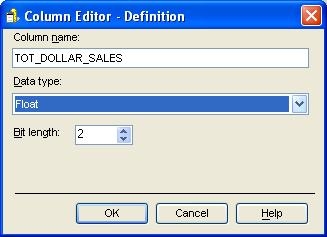
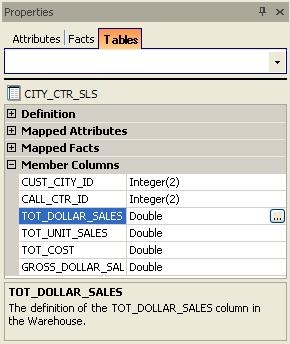
  • Select one of the member columns in table properties on the right side pane and open Column Editor. 
ka04W000000OdivQAC_0EM440000002E1a.jpeg
  • In column editor, change a data type to the required value and click OK as shown in the image below.
ka04W000000OdivQAC_0EM440000002E1Y.jpeg
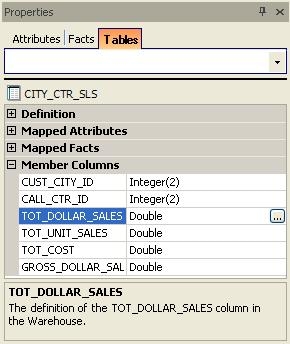
  • Notice that there is no change in table properties. The data type change is not reflected.
ka04W000000OdivQAC_0EM440000002E1e.jpeg

 
CAUSE:
 
This is a known issue with Strategy Architect 9.x and 10.x.
 
ACTION:
 
Contact Strategy Technical Support for an update on the status of this issue.
 
WORKAROUND:
 There are two possible workarounds for this issue:

  1. Save Strategy Architect after changing the data types and update the changes. 
  2. Refresh the  screen by clicking on another table in Project Table View and switch back to the original table to see the changes.


Comment

0 comments

Details

Knowledge Article

Published:

June 19, 2017

Last Updated:

June 19, 2017