EducationSoftwareStrategy.com
StrategyCommunity

Knowledge Base

Product

Community

Knowledge Base

TopicsBrowse ArticlesDeveloper Zone

Product

Download SoftwareProduct DocumentationSecurity Hub

Education

Tutorial VideosSolution GalleryEducation courses

Community

GuidelinesGrandmastersEvents
x_social-icon_white.svglinkedin_social-icon_white.svg
Strategy logoCommunity

© Strategy Inc. All Rights Reserved.

LegalTerms of UsePrivacy Policy
  1. Home
  2. Topics

KB33812: Images in Dashboards are do not appear when viewed in Flash View in MicroStrategy Developer 9.x and 10.x (Flash mode deprecated in 10.x)


Stefan Zepeda

Salesforce Solutions Architect • Strategy


KB33812: Images in Dashboards are do not appear when viewed in Flash View in MicroStrategy Developer 9.x and 10.x (Flash mode deprecated in 10.x)

SYMPTOM:
After setting up a relative path for a document per the following Strategy Knowledge Base technical note, the image does not display in the Strategy Developer 9.x and 10.x flash view mode:
KB31104: How to correctly access an image in documents with MicroStrategy 9.0.0
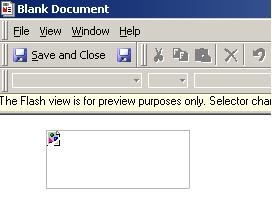
 

ka02R000000kXGcQAM_0EM440000002E1v.jpeg


CAUSE:
Strategy Developer 9.x and 10.x Flash View mode looks in a different location than PDF mode.
 
 
ACTION:
Copy the image to C:\Program Files\Common Files\MicroStrategy\images.


Comment

0 comments

Details

Knowledge Article

Published:

June 19, 2017

Last Updated:

June 19, 2017