EducationSoftwareStrategy.com
StrategyCommunity

Knowledge Base

Product

Community

Knowledge Base

TopicsBrowse ArticlesDeveloper Zone

Product

Download SoftwareProduct DocumentationSecurity Hub

Education

Tutorial VideosSolution GalleryEducation courses

Community

GuidelinesGrandmastersEvents
x_social-icon_white.svglinkedin_social-icon_white.svg
Strategy logoCommunity

© Strategy Inc. All Rights Reserved.

LegalTerms of UsePrivacy Policy
  1. Home
  2. Topics

KB33925: "Delivery Managers" icon is missing in a MicroStrategy Desktop 9.x 3-tier connection


Community Admin

• Strategy


SYMPTOM:
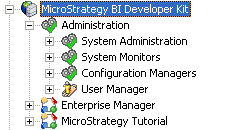
When viewing the Administration icons in a Strategy Desktop 9.x 3-tier connection as Administrator, the "Delivery Managers" icon is not available:
 

ka04W000000Ogs5QAC_0EM440000002AoA.png


CAUSE:
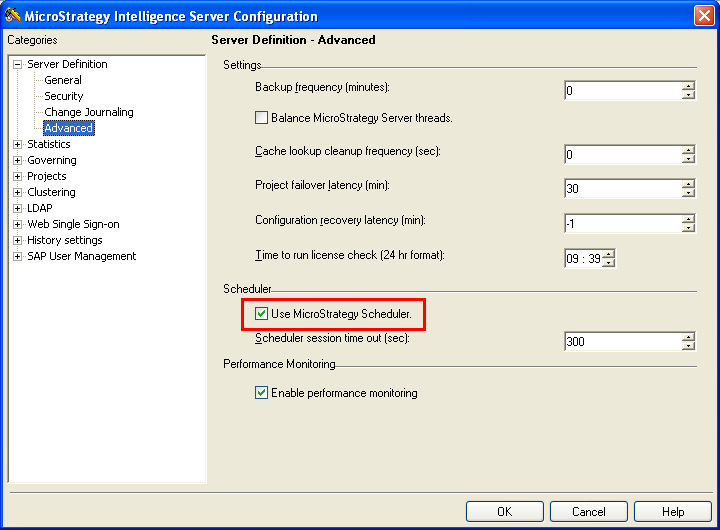
One possible cause is the 'Use Strategy Scheduler' option is not checked in the Intelligence Server configuration. If the Strategy Scheduler is disabled, Distribution Services is also disabled.
 
 
ACTION:
Check the option to 'Use Strategy Scheduler' in the Intelligence Server Configuration > Server Definition > Advanced and restart the Intelligence Server:
 

ka04W000000Ogs5QAC_0EM440000002Ao2.png

 
Contact Strategy Technical Support if the 'Use Strategy Scheduler' option is checked and the "Delivery Managers" icon is still not available.


Comment

0 comments

Details

Knowledge Article

Published:

June 8, 2017

Last Updated:

June 8, 2017