EducationSoftwareStrategy.com
StrategyCommunity

Knowledge Base

Product

Community

Knowledge Base

TopicsBrowse ArticlesDeveloper Zone

Product

Download SoftwareProduct DocumentationSecurity Hub

Education

Tutorial VideosSolution GalleryEducation courses

Community

GuidelinesGrandmastersEvents
x_social-icon_white.svglinkedin_social-icon_white.svg
Strategy logoCommunity

© Strategy Inc. All Rights Reserved.

LegalTerms of UsePrivacy Policy
  1. Home
  2. Topics

KB33933: After MicroStrategy Narrowcast 9.x - 10.x is installed on a Windows 2008 64-bit machine, DCOM components MCProxy and MCDMProxy cannot be found under DCOM Config,


Community Admin

• Strategy


After the user installs MicroStrategy Narrowcast 9.x - 10.x on a Windows 2008 64-bit machine, two DCOM components MCProxy and MCDMProxy, used to configure remote administration, cannot be found in the DCOM Config.

SYMPTOM:
After the user installs Strategy Narrowcast 9.0.1 - 9.2.x on a Windows 2008 64-bit machine, two DCOM components MCProxy and MCDMProxy, used to configure remote administration, cannot be found in the DCOM Config.
 
NOTE: To access DCOM Config, go to Start > Run and type "dcomcnfg", then navigate to Component Services > Computers > My Computer > DCOM Config.
 
CAUSE:
Registry values which make reference to the above DCOM components are not completely configured.
This is a known issue with Strategy 9.x - 10.x on a Windows 2008 64-bit machine.
 
ACTION:
Currently this issue is still being reviewed for feasibility by our Technology team and is not scoped for any upcoming scheduled Strategy release.
 
WORKAROUND:
Follow the steps below to manually set the registry values:
  • Close all Strategy applications and the DCOM Config console.
  • Go to Start > Run, and type "regedit"
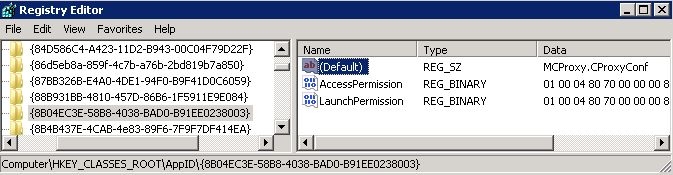
  • Browse to HKEY_CLASSES_ROOT\Wow6432Node\AppID\{8B04EC3E-58B8-4038-BAD0-B91EE0238003} and set the value for (Default) = MCProxy.CProxyConf
     
ka04W000001MKwTQAW_0EM440000002Ang.jpeg
  • Browse to HKEY_CLASSES_ROOT\Wow6432Node\AppID\{240A7E3D-9FD6-4534-8ED0-1FFE2FE754B9} and set the value for (Default) = MCDMProxy.CAdminServiceManager
     
ka04W000001MKwTQAW_0EM440000002Ank.jpeg


Comment

0 comments

Details

Knowledge Article

Published:

April 3, 2017

Last Updated:

April 3, 2017