EducationSoftwareStrategy.com
StrategyCommunity

Knowledge Base

Product

Community

Knowledge Base

TopicsBrowse ArticlesDeveloper Zone

Product

Download SoftwareProduct DocumentationSecurity Hub

Education

Tutorial VideosSolution GalleryEducation courses

Community

GuidelinesGrandmastersEvents
x_social-icon_white.svglinkedin_social-icon_white.svg
Strategy logoCommunity

© Strategy Inc. All Rights Reserved.

LegalTerms of UsePrivacy Policy
  1. Home
  2. Topics

KB33974: '%1 is not a valid Win32 application' error appears when launching MicroStrategy Web or Web Administrator page in MicroStrategy Web 9.0.x on Windows 2008


Community Admin

• Strategy


SYMPTOM:
 
When accessing the Strategy Web or Web Administrator page, an error, 'Oxcl: %1 is not a valid Win32 application' occurs in certain Strategy Web installation on Windows 2008 (64bit):
 
Sample Code/Error
Server Error in '/Strategy' Application.
Oxcl: %1 is not a valid Win32 application
 
STEPS TO REPRODUCE:

  1. Install Strategy products other than Strategy Web such as Intelligence Server on Windows 2008 (64 bit).
  2. Modify the installation on the machine to add the Strategy Web components.
  3. After the installation, launching Strategy Web returns the above error.

CAUSE:
 
One possible cause for this issue is that the registry values in the machine are not updated correctly. 
 
ACTION:
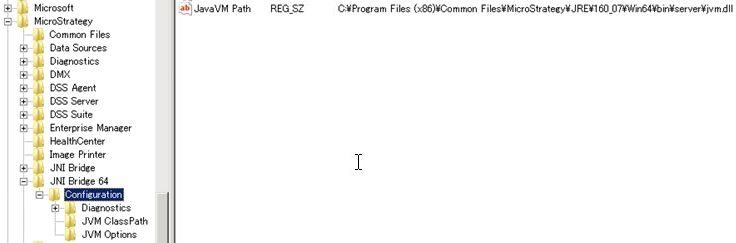
 

  • Open registry editor.
  • Go to HKEY_LOCAL_MACHINE\SOFTWARE\Wow6432Node\MicroStrategy\JNI Bridge 64\Configuration\JavaVM Path
  • Confirm the correct path is inserted to the value:
     
    C:\Program Files (x86)\Common Files\MicroStrategy\JRE\160_07\Win64\bin\server\jvm.dll
     
ka04W000000OcUYQA0_0EM4400000027vJ.jpeg


WARNING:
Modifying registry values incorrectly may cause serious, system-wide problems that may require the re-installation of Microsoft Windows NT. Any edit of the registry is done at the user`s own risk. Since these are user-initiated changes, they are not covered by any Strategy warranty. If using Microsoft Windows NT, the user should backup the registry and/or update an Emergency Repair Disk (ERD) prior to alterations.


Comment

0 comments

Details

Knowledge Article

Published:

July 18, 2017

Last Updated:

July 18, 2017