EducationSoftwareStrategy.com
StrategyCommunity

Knowledge Base

Product

Community

Knowledge Base

TopicsBrowse ArticlesDeveloper Zone

Product

Download SoftwareProduct DocumentationSecurity Hub

Education

Tutorial VideosSolution GalleryEducation courses

Community

GuidelinesGrandmastersEvents
x_social-icon_white.svglinkedin_social-icon_white.svg
Strategy logoCommunity

© Strategy Inc. All Rights Reserved.

LegalTerms of UsePrivacy Policy
  1. Home
  2. Topics

KB33989: Users cannot highlight and copy portions of a report in MicroStrategy Web 9.2.x


Community Admin

• Strategy


Users cannot highlight and copy portions of a report in MicroStrategy Web 9.2.x

SYMPTOM
In Strategy Web 9.2.x, users cannot highlight and copy portions of a report.
 
 
STEPS TO REPRODUCE

  • Run the following report in the Strategy Tutorial Project in an 8.1.x Web: Strategy Tutorial > Shared Reports > Subject Areas > Customer Analysis > Yearly Revenue Growth by Customer Region.
     
    Users are able to copy the contents on the report page.  Users can also highlight, right click and copy content, as seen below:
     
ka04W000000Oe89QAC_0EM4400000027vG.gif
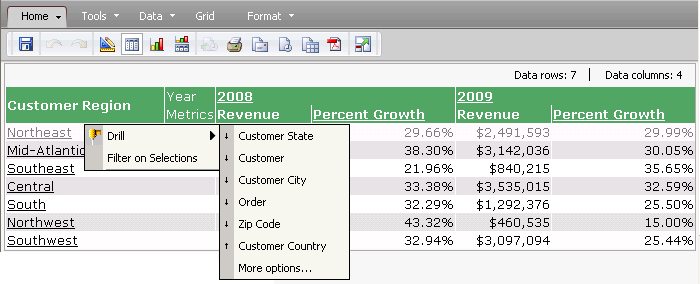
  • Run the same report in 9.2.x Web
     
    Users are not able to copy the contents on the page.  Users cannot highlight, right click and copy content.  Instead, users will see the Strategy Web Context Menu when right clicking on any of the data within the report, as seen below:
     
ka04W000000Oe89QAC_0EM4400000027vB.gif

CAUSE
This is a known issue with Strategy Web 9.2.x.  In Strategy 9.2.x, the Strategy specific context menu is displayed instead of the browser menu.
 
ACTION
This issue has been addressed in Strategy 9.3.1. Please upgrade to take advantage of this fix.
 
 WORKAROUND
To workaround this issue, users can export Strategy Web reports to Microsoft Excel to copy the content within Microsoft Excel.


Comment

0 comments

Details

Knowledge Article

Published:

June 14, 2017

Last Updated:

June 14, 2017