EducationSoftwareStrategy.com
StrategyCommunity

Knowledge Base

Product

Community

Knowledge Base

TopicsBrowse ArticlesDeveloper Zone

Product

Download SoftwareProduct DocumentationSecurity Hub

Education

Tutorial VideosSolution GalleryEducation courses

Community

GuidelinesGrandmastersEvents
x_social-icon_white.svglinkedin_social-icon_white.svg
Strategy logoCommunity

© Strategy Inc. All Rights Reserved.

LegalTerms of UsePrivacy Policy
  1. Home
  2. Topics

KB34032: How to modify the sender and reply-to details for email deliveries using MicroStrategy Distribution Services 9.x and 10.x?


Community Admin

• Strategy


How to modify the sender and reply-to details for email deliveries using MicroStrategy Distribution Services 9.x and 10.x?

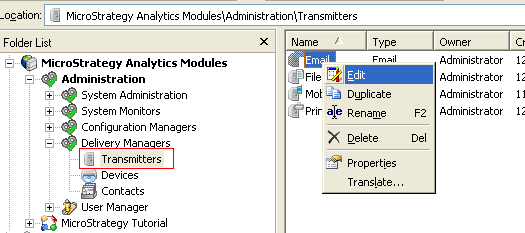
The sender and reply-to details for email deliveries in Strategy Distribution Services 9.x  and 10.x can be modified through the Email transmitter being used. This can be done in Strategy Developer by going to Administration > Delivery Managers > Transmitters, and editing the Email transmitter as shown:
 

ka04W000000OggwQAC_0EM440000002Anv.png


ka04W000000OggwQAC_0EM440000002Any.png

 
The sender name and email address appear in the From field of the emails delivered using this transmitter in Strategy Distribution Services 9.x and 10.x. The reply-to name and email address is used when users reply to the emails delivered using this transmitter in Strategy Distribution Services 9.x and 10.x.


Comment

0 comments

Details

Knowledge Article

Published:

June 13, 2017

Last Updated:

June 13, 2017