SYMPTOM:
User obtains the following error message when attempting to run a report in Strategy Developer (or Strategy Web) against a Teradata database:

QueryEngine encountered error: Execute Query failed.Error type: Odbc error. Odbc operation attempted: SQLExecDirect. The transaction was aborted by the user.
Make sure to re-start Strategy Intelligence Server for the setting changes to take effect.
It is recommended to set the ‘Maximum query execution time (sec)’ and 'Maximum connection attempt time (sec)' settings (these two settings are located at Database Connection > Advanced) to a reasonably high finite number (such as 3600 seconds). It is recommended to not set either of these to -1.
3. If there is no evidence of SQLCancel being issued by the Strategy query engine, consider enabling the following ODBC options on the Teradata DSN:
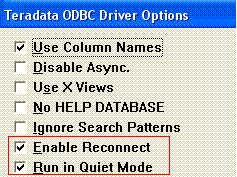
To enable these options for Teradata DSN on UNIX/Linux, add the following parameters to the odbc.ini file:
EnableReconnect=Yes
RunInQuietMode=Yes
Third Party Software Installation WARNING
The third-party product(s) discussed in this article is manufactured by vendors independent of Strategy. Strategy makes no warranty, express, implied or otherwise, regarding this product, including its performance or reliability.
