EducationSoftwareStrategy.com
StrategyCommunity

Knowledge Base

Product

Community

Knowledge Base

TopicsBrowse ArticlesDeveloper Zone

Product

Download SoftwareProduct DocumentationSecurity Hub

Education

Tutorial VideosSolution GalleryEducation courses

Community

GuidelinesGrandmastersEvents
x_social-icon_white.svglinkedin_social-icon_white.svg
Strategy logoCommunity

© Strategy Inc. All Rights Reserved.

LegalTerms of UsePrivacy Policy
  1. Home
  2. Topics

KB34053: "Object variable or With block variable not set" error occurs when performing an Update Object Deletion operation in MicroStrategy Enterprise Manager


Community Admin

• Strategy


"Object variable or With block variable not set" error occurs when performing an Update Object Deletion operation in MicroStrategy Enterprise Manager 9.x

SYMPTOM:
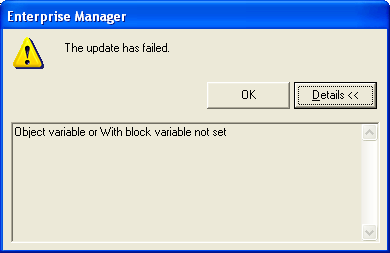
When performing an 'Update Object Deletion' operation in Strategy Enterprise Manager 9.x, the following error message is seen and the operation fails:
 

ka04W000000OdkXQAS_0EM440000002Anh.png

 
Sample Code/Error
The update has failed.
Object variable or With block variable not set
 
 
CAUSE:
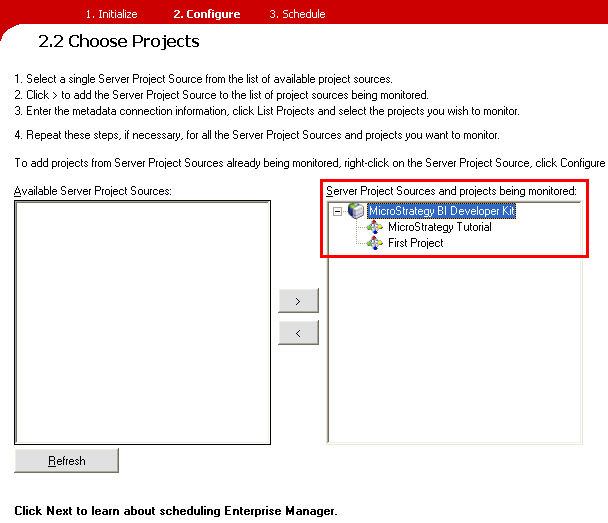
One possible cause for this error is Enterprise Manager is configured to monitor a project which is not currently loaded on the Strategy Intelligence Server 9.x. The projects currently monitored by Enterprise Manager can be checked in the Enterprise Manager Console under step 2. Configure:
 

ka04W000000OdkXQAS_0EM440000002Anj.png


ACTION:
Reset the projects configured to be monitored by Strategy Enterprise Manager 9.x:

  1. In Enterprise Manager Console under step 2. Configure, move all projects and project sources from the right window back to the left.
  2. Select the desired project source(s) and move to the right.
  3. In the Select Projects dialog, select only the projects to be monitored and ensure these projects are loaded on the Intelligence Server.


Comment

0 comments

Details

Knowledge Article

Published:

June 18, 2017

Last Updated:

June 18, 2017