SYMPTOM:
User runs a report in Strategy Developer/Web and obtains the following error message (screenshot below is from Developer):
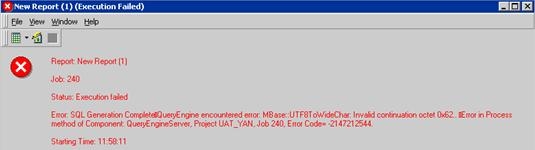
QueryEngine encountered error: MBase::UTF8ToWideChar: Invalid continuation octet...
The results set is also retrieved without any error when the report SQL is run through Strategy DB Query Tool, however incorrect characters can be seen at places within the data.
CAUSE:
The error is caused by the presence of certain characters (such as é) that are incorrectly stored in the database. While the database uses a code page that supports the character in question, the character itself is incorrectly stored. This is determined by updating the record manually in the database with the correct character and then the report runs successfully without error.
While the report runs without error through DB Query Tool, these incorrectly stored characters display unintelligibly such as a question mark (?) or square (�). The difference between DB Query Tool versus Strategy Developer/Web is in the handling of these unintelligible characters - while DB Query Tool lets the SQL run and display the results (albeit with the unintelligible characters), the Strategy product throws the above error.
ACTION:
The recommendation is to correct the underlying problem of these characters being incorrectly stored in the database.
