EducationSoftwareStrategy.com
StrategyCommunity

Knowledge Base

Product

Community

Knowledge Base

TopicsBrowse ArticlesDeveloper Zone

Product

Download SoftwareProduct DocumentationSecurity Hub

Education

Tutorial VideosSolution GalleryEducation courses

Community

GuidelinesGrandmastersEvents
x_social-icon_white.svglinkedin_social-icon_white.svg
Strategy logoCommunity

© Strategy Inc. All Rights Reserved.

LegalTerms of UsePrivacy Policy
  1. Home
  2. Topics

KB34067: How to restrict element selections for attributes in a hierarchy prompt in MicroStrategy Developer 9.x?


Stefan Zepeda

Salesforce Solutions Architect • Strategy


How to restrict element selections for attributes in a hierarchy prompt in MicroStrategy Developer 9.x?

Follow the steps below to restrict the Year attribute in a Time hierarchy prompt to element selections "2007,2008" in the Strategy Tutorial project:
 

  • Create an attribute element filter to filter out "2007,2008" for attribute "Year".
  • Open the "Time" hierarchy in hierarchy editor.
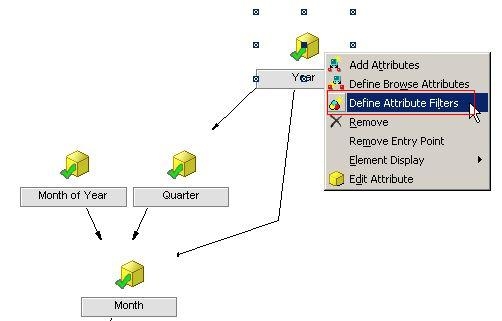
  • Right click on the "Year" attribute and select "Define Attribute Filters", as shown below:
ka02R000000kX6gQAE_0EM440000002E0I.jpeg
  • Select the filter created in step1 in the pop-up dialog.

After performing the steps above, the element selections for attribute "Year" will be restricted to "2007,2008" in the Time hierarchy prompt, as shown below:
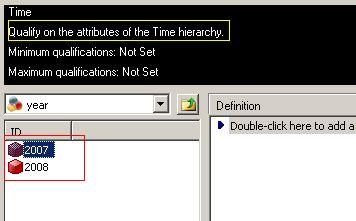
 

ka02R000000kX6gQAE_0EM440000002E0G.jpeg


Comment

0 comments

Details

Knowledge Article

Published:

April 10, 2017

Last Updated:

April 10, 2017