EducationSoftwareStrategy.com
StrategyCommunity

Knowledge Base

Product

Community

Knowledge Base

TopicsBrowse ArticlesDeveloper Zone

Product

Download SoftwareProduct DocumentationSecurity Hub

Education

Tutorial VideosSolution GalleryEducation courses

Community

GuidelinesGrandmastersEvents
x_social-icon_white.svglinkedin_social-icon_white.svg
Strategy logoCommunity

© Strategy Inc. All Rights Reserved.

LegalTerms of UsePrivacy Policy
  1. Home
  2. Topics

KB34097: Reports used as filters for element list prompts do not hit cache in MicroStrategy Intelligence Server 9.x and 10.x


Community Admin

• Strategy


When a report is used as a filter in an element list prompt, it does not hit cache.

SYMPTOM:
When a report is used as a filter in an element list prompt, it does not hit cache.
An example of this behavior can be setup as follows using Strategy Tutorial:
 

  • Create 'Report A' in the Strategy Tutorial project using attribute 'Year'.
  • Run the report to generate a cache file.
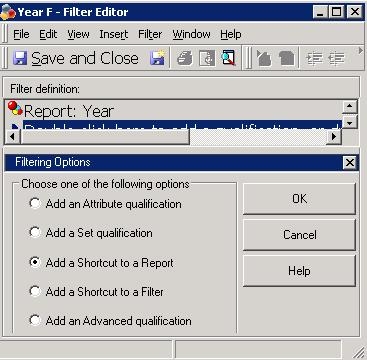
  • Create a filter based on the report using "Add a Shoutcut to a Report" functionality, see below screenshot:
     
ka04W000000OeOCQA0_0EM440000002AnD.jpeg
  • Create an element prompt using this filter, see below screenshot:
     
ka04W000000OeOCQA0_0EM440000002AnB.jpeg
  • Create a new report and add the prompt to the filter, run the report, report A is not hitting the cache file.

 
CAUSE:
This is the expected behaviour for reports as a filter in Strategy Intelligence Server 9.0.x. Reports that are used as a filter are resolved in the SQL Engine for report execution and prompt element browsing - and the report is never actually executed as a report instance so no matching cache can be hit.
 
 
ACTION:
The Intelligence Server product is behaving as designed. Reports as a filter cannot use a cache in another report instance execution.


Comment

0 comments

Details

Knowledge Article

Published:

June 9, 2017

Last Updated:

June 9, 2017