The example provided in this document is provided “as-is” to the user and assumes that the user:
PREREQUISITES:
For the sample to work, the Strategy Web JAR files must be accessible by the Java Runtime
Environment. The Strategy Web JAR files can be found under:
Note:
More elaborate programs will require additional library files and are out of the scope of this document.
SUMMARY: In Strategy Web, it is possible to use the View Filter Editor to define filters on the fly based on the data that is already present on the report. The following example, shows that expressions based on attributes and metrics can be created:
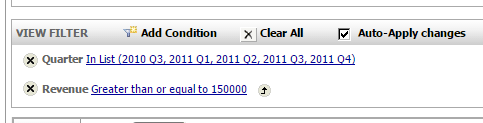
It is possible to access the expressions in the View Filter are using the Strategy Java Web SDK 9.4.x. When programmatically accessing the expressions in the View Filter is important to note that although both attribute and metric expressions are appearing in the view filter editor panel in the screenshot above, it is actually generated by two separate methods.
The following code demonstrates how to retrieve both attribute and metric expressions from the View filter of a report:
package customclasses.misc;

import com.Strategy.web.objects.EnumWebLimitSummaryFlags;
import com.Strategy.web.objects.WebExpression;
import com.Strategy.web.objects.WebIServerSession;
import com.Strategy.web.objects.WebObjectInfo;
import com.Strategy.web.objects.WebObjectSource;
import com.Strategy.web.objects.WebObjectsException;
import com.Strategy.web.objects.WebObjectsFactory;
import com.Strategy.web.objects.WebReportInstance;
import com.Strategy.web.objects.WebReportSource;
import com.Strategy.webapi.EnumDSSXMLApplicationType;
import com.Strategy.webapi.EnumDSSXMLObjectTypes;

public class GetMetricExpressionInViewFilter {


 public static void main(String[] args) {

  String SessionID = "";

//  Create factory object.

   WebObjectsFactory factory=WebObjectsFactory.getInstance();

   WebIServerSession serverSession=factory.getIServerSession();
   serverSession.setServerName("IServerName");
   serverSession.setServerPort(0);
   serverSession.setProjectName("ProjectName");
   serverSession.setLogin("UserLogin");
   serverSession.setPassword("UserPwd");
   serverSession.setApplicationType(EnumDSSXMLApplicationType.DssXmlApplicationCustomApp);

   try {

   SessionID = serverSession.getSessionID();
   System.out.println("Welcome " + serverSession.getLogin());
   System.out.println("SessionID: " + SessionID);
   } catch (WebObjectsException ex) {}

   String strReportID = "E71F2A0A45B9706431D7D4AA0A1EC477";  //report with expressions in the view filter
   WebObjectSource oSource = factory.getObjectSource();

   try {
  WebObjectInfo reportObject = oSource.getObject(strReportID, EnumDSSXMLObjectTypes.DssXmlTypeReportDefinition, true);
  WebReportSource reportSource=factory.getReportSource();
  WebReportInstance reportInstance=null;
  reportInstance=reportSource.getNewInstance(reportObject.getID());
  reportInstance.setAsync(false);

        int status = reportInstance.pollStatus();
        System.out.println("number of rows: "+reportInstance.getGridData().getGridTotalRows());
       WebExpression e1 =  reportInstance.getLimitSummary(EnumWebLimitSummaryFlags.WebLimitViewFilter);

       System.out.println("E1: "+ e1.getXML());
       WebExpression e2 = reportInstance.getFilter().getExpression();

       System.out.println("E2" + e2.getXML());
 } catch (Exception e) {

  e.printStackTrace();

 }

 }

}