EducationSoftwareStrategy.com
StrategyCommunity

Knowledge Base

Product

Community

Knowledge Base

TopicsBrowse ArticlesDeveloper Zone

Product

Download SoftwareProduct DocumentationSecurity Hub

Education

Tutorial VideosSolution GalleryEducation courses

Community

GuidelinesGrandmastersEvents
x_social-icon_white.svglinkedin_social-icon_white.svg
Strategy logoCommunity

© Strategy Inc. All Rights Reserved.

LegalTerms of UsePrivacy Policy
  1. Home
  2. Topics

KB34118: How to compare the properties of two metrics using Command Manager?


Community Admin

• Strategy


How to compare the properties of two metrics using Command Manager?

In a project, users may wish to compare the properties of two or more metrics, to establish whether these may be duplicates.
One means of doing this is to use the "List all metrics for project" outline under Outlines\Metrics in Command Manager and export the content for further analysis.
This can be achieved as follows:

  • Connect to a project source from Command Manager
  • Insert the outline "LIST ALL PROPERTIES FOR METRIC", which may be found under Outlines\Metrics, and specify the name and location of the metric in question:
     
ka04W000001MKscQAG_0EM440000002AnY.jpeg
  •  
    LIST ALL PROPERTIES FOR METRIC "Revenue" IN FOLDER "\Public Objects\Metrics\Sales Metrics" FOR PROJECT "Strategy Tutorial";
     
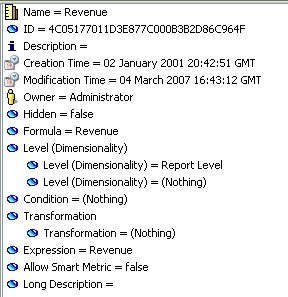
  • The results of the above script will include the following information for the metric in question:
     
ka04W000001MKscQAG_0EM440000002AnV.jpeg
  •  
    NAME
    ID
    DESCRIPTION
    CREATIONTIME
    MODIFICATIONTIME
    OWNER
    HIDDEN
    FORMULA
    LEVEL
    CONDITION
    TRANSFORMATION
    EXPRESSION
    LONGDESCRIPTION 
     
  • Export the results of the above to Excel, via the option 'Export Results to Excel' under the 'File' menu.
  • Repeat the above steps for any further metrics as desired.
  • This will allow for easy comparison of the metrics' properties in the resulting spreadsheet.

Comment

0 comments

Details

Knowledge Article

Published:

April 4, 2017

Last Updated:

April 4, 2017