EducationSoftwareStrategy.com
StrategyCommunity

Knowledge Base

Product

Community

Knowledge Base

TopicsBrowse ArticlesDeveloper Zone

Product

Download SoftwareProduct DocumentationSecurity Hub

Education

Tutorial VideosSolution GalleryEducation courses

Community

GuidelinesGrandmastersEvents
x_social-icon_white.svglinkedin_social-icon_white.svg
Strategy logoCommunity

© Strategy Inc. All Rights Reserved.

LegalTerms of UsePrivacy Policy
  1. Home
  2. Topics

KB34123: How to ascertain dependents of multiple metrics simultaneously in Command Manager version?


Community Admin

• Strategy


In MicroStrategy Developer, it is possible to right-click any particular metric and identify its dependent objects by selecting the 'Search for dependents' option.

In Strategy Developer, it is possible to right-click any particular metric and identify its dependent objects by selecting the 'Search for dependents' option.
 
A similar result may be achieved with Command Manager, making it possible to obtain this information for multiple metrics simultaneously.  This can be accomplished as follows: 

  • Connect to a project source from Command Manager.
  • Insert the 'List_Dependents_Outline', available under \Outlines\Miscellaneous_Outlines.
  • Using one line for each metric, add the name of the metric in question and its location:
     
ka04W000000OelWQAS_0EM440000002AnH.jpeg
  •  
    LIST ALL DEPENDENTS FOR METRIC "Revenue" IN FOLDER "\Public Objects\Metrics\Sales Metrics" IN PROJECT "Strategy Tutorial";
    LIST ALL DEPENDENTS FOR METRIC "Profit" IN FOLDER "\Public Objects\Metrics\Sales Metrics" IN PROJECT "Strategy Tutorial"; 
     
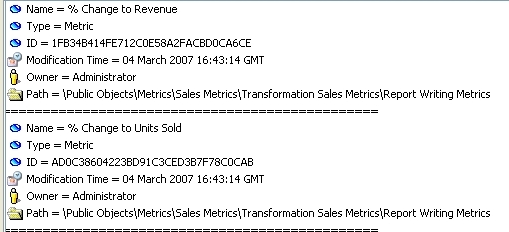
  • The output of this script will consist of a list of dependent objects for the each of the metrics selected in step 3:
     
ka04W000000OelWQAS_0EM440000002AnJ.jpeg


Comment

0 comments

Details

Knowledge Article

Published:

June 7, 2017

Last Updated:

June 7, 2017