EducationSoftwareStrategy.com
StrategyCommunity

Knowledge Base

Product

Community

Knowledge Base

TopicsBrowse ArticlesDeveloper Zone

Product

Download SoftwareProduct DocumentationSecurity Hub

Education

Tutorial VideosSolution GalleryEducation courses

Community

GuidelinesGrandmastersEvents
x_social-icon_white.svglinkedin_social-icon_white.svg
Strategy logoCommunity

© Strategy Inc. All Rights Reserved.

LegalTerms of UsePrivacy Policy
  1. Home
  2. Topics

KB34143: How to create a schedule the purge of Element Cache in MicroStrategy Intelligence Server 9.x and higher versions


Community Admin

• Strategy


In MicroStrategy Intelligence Server 9.x and higher, it is possible to create a scheduled Administrative Task which purges the project level element caches. This task can configured to use a time or event-based schedule.

In Strategy Intelligence Server 9.x and higher, it is possible to create a scheduled Administrative Task which purges the project level element caches. This task can configured to use a time or event-based schedule.
 
 
Using a Scheduled Administrative Task
  • In Strategy Developer connect to the desired Strategy Intelligence Server via a 3-tier project source.
  • From the Administration drop-down menu, select Scheduling > Schedule Administrative Tasks...
  • Under "Available project" select the desired project to have the element caches purged from.
  • Select "Purge Element Caches" from the drop-down menu in Administrative Tasks interface.   
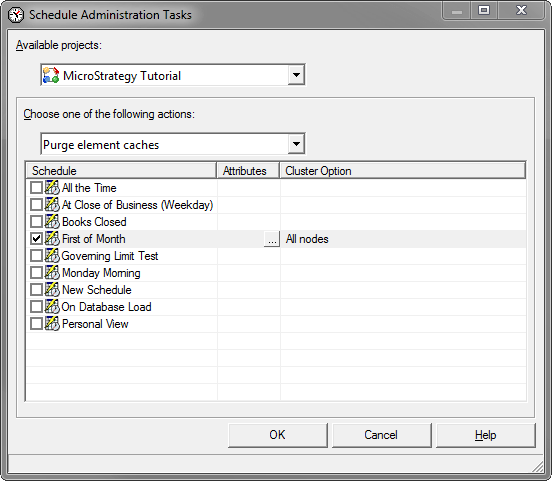
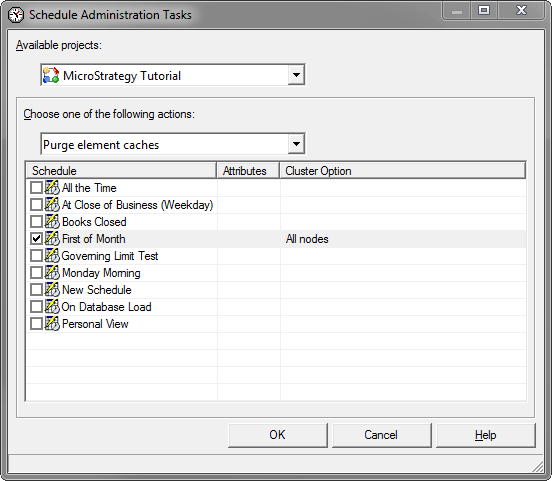
  • Select a schedule for which to perform the purging.  Optionally, you can also specify a set of attributes and/or cluster nodes for which the element cache should be purged.
     
ka04W000000Of8DQAS_0EM440000002Amw.png
  •  
     
    Under the Attributes column, it is possible to select a subset of attributes to purge by clicking the empty cell next to the selected Schedule. If this is left blank, all for the attribute element caches will be purged.
     
ka04W000000Of8DQAS_0EM440000002Amv.png
  •  
    Under the Cluster Option column, the options for how the purge should be performed in a cluster can be set. The available options are "All nodes" or "Local node". The default option is to purge the cache on all nodes.
  • If multiple projects need to be scheduled, repeat steps 3 - 5 for each of the other projects. 

 
Using Strategy Command Manager
In Strategy Command Manager 9.x and higher, it is possible to purge element caches direclty using the following script:
PURGE ELEMENT CACHING IN ( PROJECTS | "<project_name>");
Strategy Command Manager does not currently support the additional options of specifying a subset of attributes to purge the element caches for. Additionally, it is not possible currently to create an Administrative Task in Strategy Command Manager as shown with Strategy Developer above.


Comment

0 comments

Details

Knowledge Article

Published:

June 2, 2017

Last Updated:

June 2, 2017