EducationSoftwareStrategy.com
StrategyCommunity

Knowledge Base

Product

Community

Knowledge Base

TopicsBrowse ArticlesDeveloper Zone

Product

Download SoftwareProduct DocumentationSecurity Hub

Education

Tutorial VideosSolution GalleryEducation courses

Community

GuidelinesGrandmastersEvents
x_social-icon_white.svglinkedin_social-icon_white.svg
Strategy logoCommunity

© Strategy Inc. All Rights Reserved.

LegalTerms of UsePrivacy Policy
  1. Home
  2. Topics

KB34236: Error when running document in two-tier (direct) mode in MicroStrategy Developer 9.x and 10.x. Documents can only be executed through server connections


Stefan Zepeda

Salesforce Solutions Architect • Strategy


Error when running document in two-tier (direct) mode in MicroStrategy Developer 9.x and 10.x. Documents can only be executed through server connections

SYMPTOM:
 
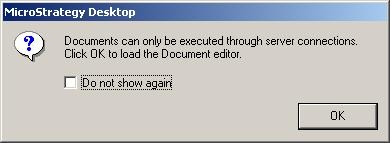
When attempting to execute a Report Services document via a two-tier connection in Strategy Desktop, the following error appears:
 

ka02R000000kVanQAE_0EM440000002Dzc.jpeg

 
Documents can only be executed through server connections.
Click OK to load the Document editor.
 
CAUSE:
 
Connecting in two-tier mode invokes a direct connection from Strategy Desktop to the metadata.  This bypasses the Intelligence Server, which manages and processes Report Services documents.
 
ACTION:
 
Connect to your project via a three-tier (Server) connection to take advantage of Report Services functionality.


Comment

0 comments

Details

Knowledge Article

Published:

May 31, 2017

Last Updated:

May 31, 2017