EducationSoftwareStrategy.com
StrategyCommunity

Knowledge Base

Product

Community

Knowledge Base

TopicsBrowse ArticlesDeveloper Zone

Product

Download SoftwareProduct DocumentationSecurity Hub

Education

Tutorial VideosSolution GalleryEducation courses

Community

GuidelinesGrandmastersEvents
x_social-icon_white.svglinkedin_social-icon_white.svg
Strategy logoCommunity

© Strategy Inc. All Rights Reserved.

LegalTerms of UsePrivacy Policy
  1. Home
  2. Topics

KB34237: What log file should be reerred to when the MDUPD-x-x.log fails to be generated during a project upgrade with MicroStrategy Configuration Wizard 9.x and above?


Community Admin

• Strategy


What log file should be reerred to when the MDUPD-x-x.log fails to be generated during a project upgrade with MicroStrategy Configuration Wizard 9.x and above?

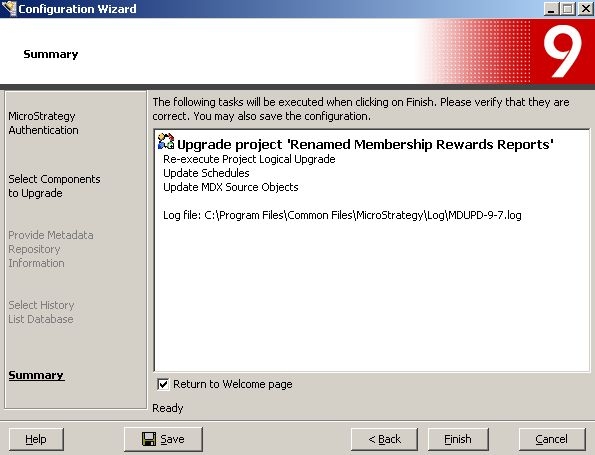
Prior to starting project upgrade, the Strategy configuration wizard shows the locations as shown below:
 

ka04W000000OdklQAC_0EM440000002An1.jpeg

 
Sample Code/Error
Log file: C:\Program Files\Common Files\MicroStrategy\Log\MDUPD-x-x.log
 
However, the log file may not be found in the specified location after "Finish" button is clicked and unable to confirm what has gone wrong.  If  an issues happens prior to the generation of MDUPD-x-x.log, refer to the MACfgWiz.xml file, which in Windows is found in:
 
Sample Code/Error
C:\Program Files\Common Files\MicroStrategy\Log
 
In a Universal environment, this file can be found in:
 
<Install Directory>\log


Comment

0 comments

Details

Knowledge Article

Published:

June 19, 2017

Last Updated:

June 19, 2017