EducationSoftwareStrategy.com
StrategyCommunity

Knowledge Base

Product

Community

Knowledge Base

TopicsBrowse ArticlesDeveloper Zone

Product

Download SoftwareProduct DocumentationSecurity Hub

Education

Tutorial VideosSolution GalleryEducation courses

Community

GuidelinesGrandmastersEvents
x_social-icon_white.svglinkedin_social-icon_white.svg
Strategy logoCommunity

© Strategy Inc. All Rights Reserved.

LegalTerms of UsePrivacy Policy
  1. Home
  2. Topics

KB34247: How to enable subtotals for all of report levels regardless the attribute positioning in MicroStrategy Web 9.x


Stefan Zepeda

Salesforce Solutions Architect • Strategy


How to enable subtotals for all of report levels regardless the attribute positioning in MicroStrategy Web 9.x

Some advanced subtotal options are available only through Strategy Developer 9.x, but not with Strategy Web.  Adding multiple groupings for subtotals is one of such features. Strategy Tutorial Project is used to explain this limitation and provides a few workarounds.
 
Define a report with Category and Year attribute and Cost metric. Using Developer's advanced subtotal options, it is possible to display both Category level subtotal as well as Year level subtotal.
 

ka02R000000kcbfQAA_0EM440000002DyT.jpeg


ka02R000000kcbfQAA_0EM440000002Dyg.jpeg

 
While the report with additional subtotal enabled can be displayed as they are in Strategy Web, the option to enable additional grouping level for the subtotal is not available in Web.
 

ka02R000000kcbfQAA_0EM440000002DyV.jpeg

This is a current limitation of Strategy Web 9.x. Please contact Strategy Technical Support for the updated status of this issue.
 
WORKAROUND:
To see subtotals in different grouping, consider trying either one of following three workaround: 
  • Pivot the position of the attribute from left to right.
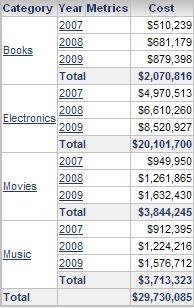
    When Category is placed left-most, the subtotals displayed are at Category level.

ka02R000000kcbfQAA_0EM440000002DyY.jpeg
  •  
     
     When Year is placed left-most, the subtotals displayed are at Year level.

ka02R000000kcbfQAA_0EM440000002Dym.jpeg
  • Pivot the potision of the attribute from row to column.
    When the Year and Category are place in row and column, subtotal of both level can be displayed at the same time.

ka02R000000kcbfQAA_0EM440000002Dyb.jpeg
  • Advanced Subtotal defined with Developer can be kept on Web though it is not editable.

ka02R000000kcbfQAA_0EM440000002Dyk.jpeg


Comment

0 comments

Details

Knowledge Article

Published:

April 11, 2017

Last Updated:

April 11, 2017