SYMPTOM:
While configuring a clean or upgraded 9.x-10.x metadata residing on an Oracle 11g database using the Configuration Wizard, the following error occurs:
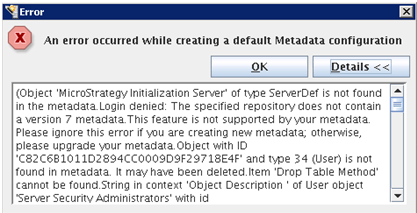
An error occurred while creating a default Metadata configuration.
(Object `Strategy Initialization Server` of type ServerDef is not found in the metadata. Login denied: The specified repository does not contain a version 7 metadata. This feature is not supported by your metadata. Please ignore this error if you are creating new metadata; otherwise, please upgrade your metadata. Object with ID `xxxxxx` and type 34 (User) is not found in metadata. It may have been deleted. Item `Drop Table Method` cannot be found. String in context `Object Description` of User object `Server Security Administrators` with id)
It is not possible for the user to continue with the configuration by selecting 'OK'.
Repeated instances of the following error are captured in the DSSErrors log file:
Error type: Odbc error. Odbc operation attempted: SQLExecDirect. ORA-00942: table or view does not exist
On further verification, however, it may be confirmed that all metadata tables have been created as desired and that the database user has sufficient permissions on them.
This issue may occur on an Oracle RAC or non-RAC system and persists even when the ODBC connection is created via the Strategy Connectivity Wizard.
CAUSE:
One possible cause of this issue may be that Oracle auditing is activated. Further clarification in this regard is available via the following links to the Oracle web site:
http://www.oracle-base.com/articles/10g/Auditing_10gR2.php
ACTION:
Deactivate the INSERT for Oracle auditing using the Oracle NOAUDIT SQL function as follows:
NOAUDIT INSERT TABLE by MS9
Please consult the following section of the Oracle web site for additional information:
http://download.oracle.com/docs/cd/B28359_01/network.111/b28531/auditing.htm
Third Party Software Installation:
WARNING:
The third-party product discussed in this technical note is manufactured by vendors independent of Strategy. Strategy makes no warranty, express, implied or otherwise, regarding this product, including its performance or reliability.
