EducationSoftwareStrategy.com
StrategyCommunity

Knowledge Base

Product

Community

Knowledge Base

TopicsBrowse ArticlesDeveloper Zone

Product

Download SoftwareProduct DocumentationSecurity Hub

Education

Tutorial VideosSolution GalleryEducation courses

Community

GuidelinesGrandmastersEvents
x_social-icon_white.svglinkedin_social-icon_white.svg
Strategy logoCommunity

© Strategy Inc. All Rights Reserved.

LegalTerms of UsePrivacy Policy
  1. Home
  2. Topics

KB34331: The document property "Height can grow" is not dynamically expanding a section in HTML view of a Report Services Document in MicroStrategy Developer 9.x


Stefan Zepeda

Salesforce Solutions Architect • Strategy


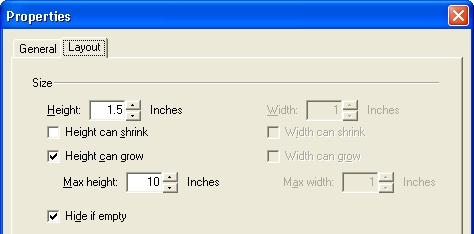
In MicroStrategy 9.x,  the document property for a section has the "Height can grow" option enabled and a max height set to some number higher than the expected height of the results

SYMPTOM:
In Strategy 9.x,  the document property for a section has the "Height can grow" option enabled and a max height set to some number higher than the expected height of the results, as shown in the screenshot:
ka02R000000kXYuQAM_0EM440000002Dwq.jpeg

 
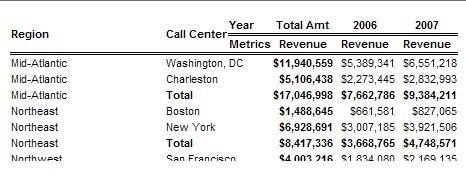
However, viewing the document in HTML, the document results displayed in the section are still being cut off at 1.5 inches, as shown in the following screenshot:
ka02R000000kXYuQAM_0EM440000002Dws.jpeg

 
CAUSE:
It is not possible for Strategy to find out the exact height of the text while rendering. Hence, this behavior is by design.
 
ACTION:
In HTML Exporting, the Report Services Document designer should specify the exact height, or higher, for the document section at document design time.


Comment

0 comments

Details

Knowledge Article

Published:

June 14, 2017

Last Updated:

June 14, 2017