SYMPTOM:
After upgrading a Strategy metadata, users notice that even though they change the default answers for one or more prompts, these changes are not reflected when executing prompted Freeform SQL reports. This also affects all Report Services document that use Freeform SQL reports.
STEPS TO REPRODUCE:
Follow the steps below to reproduce this issue in the Strategy Tutorial project, using Strategy Developer:
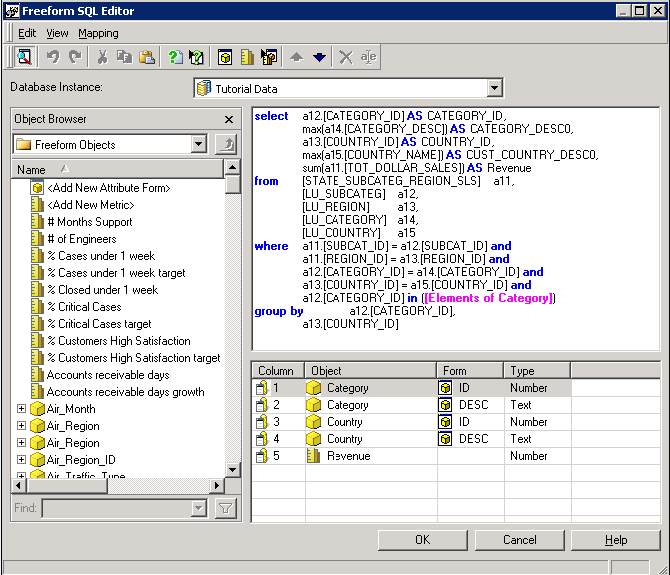
1. Create a Freeform SQL report that uses an attribute element prompt based on attribute Category. Set the prompt's default answers to Books & Electronics. A screenshot of the report is shown below:
2. Create a Report Services document that uses the Freeform SQL report created in step 1.
3. Upgrade the metadata to a newer Strategy version.
4. Change the default answer of the prompt created in step 1 to Movies.
5. The change made in step 5 is not reflected when executing either the Report Services document created in step 2 nor the Freeform SQL Report created in step 1.
CAUSE:
The report is saved with the “Set the current prompt answers to be the default prompt answers” option. This will put the previous default answer in the report’s prompt instance’s answer.
ACTION:
To avoid this, we should save the report while clean the option to use current answer for default prompt answer. This way, the change to the prompt’s definition will be picked up the next time the report is run.
Another thing to notice is that we need to save the report after the prompt’s default answer is changed since the prompt is embedded in the report.
