EducationSoftwareStrategy.com
StrategyCommunity

Knowledge Base

Product

Community

Knowledge Base

TopicsBrowse ArticlesDeveloper Zone

Product

Download SoftwareProduct DocumentationSecurity Hub

Education

Tutorial VideosSolution GalleryEducation courses

Community

GuidelinesGrandmastersEvents
x_social-icon_white.svglinkedin_social-icon_white.svg
Strategy logoCommunity

© Strategy Inc. All Rights Reserved.

LegalTerms of UsePrivacy Policy
  1. Home
  2. Topics

KB34418: "CastorServer Instance" does not show up as an option in MicroStrategy Diagnostics Configuration under "Select Configuration".


Community Admin

• Strategy


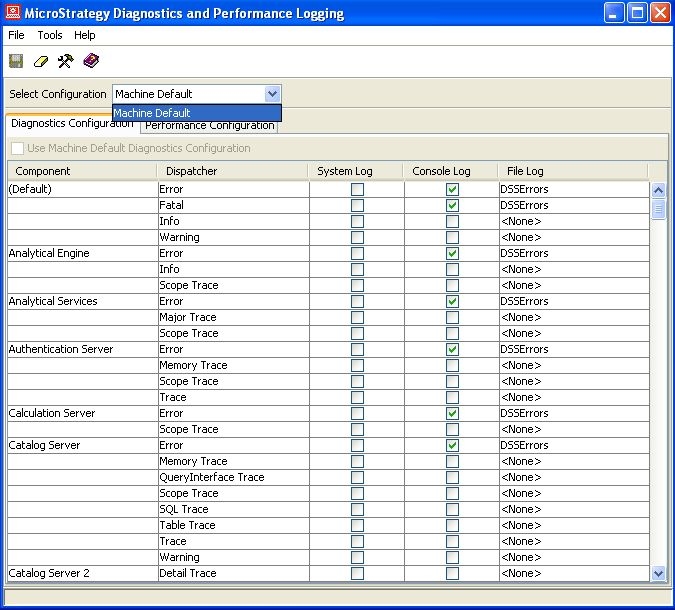
This article notes how configurations work in the diagnostics tool

SYMPTOM:
In the Strategy Diagnostics Configuration tool, the option to select "CastorServer Instance" is not available from the "Select Configuration" drop-down menu.  The only available selection is "Machine Default".
 

ka04W000000OfoVQAS_0EM440000002WsO.jpeg
ka04W000000OfoVQAS_0EM440000002WsP.jpeg


CAUSE:
The machine does not have the Strategy Intelligence Server component installed on it. The 'CastorServer' set of traces applies only to the Strategy Intelligence Server.
 
 
ACTION:
Enable the CastorServer level Diagnostic logging on the Strategy Intelligence Server machine. 


Comment

0 comments

Details

Knowledge Article

Published:

July 21, 2017

Last Updated:

July 21, 2017