SYMPTOM:
In Strategy Enterprise Manager 9.0.1, scheduled data loads fail when using an Oracle 10g data source name (DSN) configured with TNS. The following error message is recorded in the MSTRMigration.log file:
A connection attempt to the Enterprise Manager warehouse failed. Please verify your credentials and the DSN selected using the DSN tab in the Options menu of the Enterprise Manager console. Please also re-configure the monitored servers and projects using the Configuration section of the Enterprise Manager console.
Connect failed. Error type: Odbc error. Odbc operation attempted: SQLDriverConnect.
ORA-00604: error occurred at recursive SQL level 1
ORA-20001: You are not authorized to access this database using this method.
ORA-06512: at line 112
Reconfiguring the DSN, data load schedule and monitored projects does not resolve the issue. In addition, manual data loads run successfully.
CAUSE:
This issue occurs because the Strategy Enterprise Manager Data Loader service is run under the Local System account. This prevents the service from accessing the Oracle database.

ACTION:
Change the Enterprise Manager Data Loader service to be run as an local administrator NT user . This can be done by right-clicking the service, select Properties, and in the 'Log On' tab, select the 'This Account' option and enter the username and password of the correct NT account:
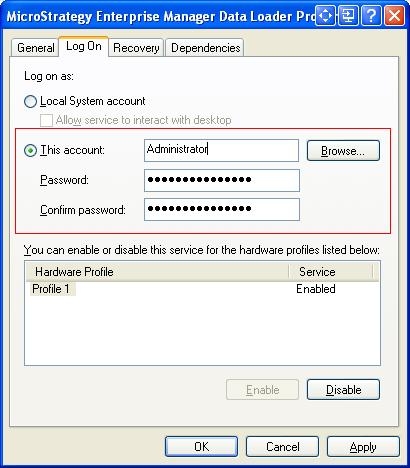
Once the service has been changed to run as an Administrator, scheduled data loads will run successfully.
