EducationSoftwareStrategy.com
StrategyCommunity

Knowledge Base

Product

Community

Knowledge Base

TopicsBrowse ArticlesDeveloper Zone

Product

Download SoftwareProduct DocumentationSecurity Hub

Education

Tutorial VideosSolution GalleryEducation courses

Community

GuidelinesGrandmastersEvents
x_social-icon_white.svglinkedin_social-icon_white.svg
Strategy logoCommunity

© Strategy Inc. All Rights Reserved.

LegalTerms of UsePrivacy Policy
  1. Home
  2. Topics

KB34454: "Failed to start service" error message appears when configuring a Master Health Agent or Health Agent in MicroStrategy Health Center 9.0.x


Community Admin

• Strategy


This article explains a possible reason why Health Center may not start.

SYMPTOM:
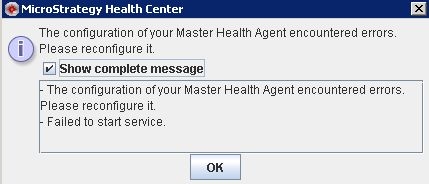
When the user configures a Master Health Agent or a Health Agent to run on ports which are already in use by other applications, the following error occurs:
 

ka04W000000OfkJQAS_0EM440000002AmO.jpeg


- The configuration of your Master Health Agent encountered errors. Please reconfigure it.
- Failed to start service

In addition, when the user checks the Error.log file, which can be found in "C:\Program Files\Common Files\Strategy\Health Center\\Logs", it has the message below:

2010-10-18 11:28:53.833 AM: Error: Could not listen on port: 34952
2010-10-18 11:28:53.833 AM: Error:     com.Strategy.tools.mcdgnstc.baseobjects.remote.socket.SocketFactory$SocketFactoryException: Address already in use: JVM_Bind

2010-10-18 11:28:53.865 AM: Error: com.Strategy.tools.mcdgnstc.baseobjects.remote.RemoteException: Address already in use: JVM_Bind


CAUSE:
Master Health Agent and Health Agent must use dedicated unused ports to be successfully started.
 
ACTION:
Please re-configure the Master Health Agent or Health Agent to run on dedicated unused ports.


Comment

0 comments

Details

Knowledge Article

Published:

June 5, 2017

Last Updated:

February 28, 2018