EducationSoftwareStrategy.com
StrategyCommunity

Knowledge Base

Product

Community

Knowledge Base

TopicsBrowse ArticlesDeveloper Zone

Product

Download SoftwareProduct DocumentationSecurity Hub

Education

Tutorial VideosSolution GalleryEducation courses

Community

GuidelinesGrandmastersEvents
x_social-icon_white.svglinkedin_social-icon_white.svg
Strategy logoCommunity

© Strategy Inc. All Rights Reserved.

LegalTerms of UsePrivacy Policy
  1. Home
  2. Topics

KB34470: What is the purpose of "Metric Level Determination" option under Analytical Engine in VLDB properties with MicroStrategy Developer 10.x?


Stefan Zepeda

Salesforce Solutions Architect • Strategy


KB34470: What is the purpose of "Metric Level Determination" option under Analytical Engine in VLDB properties with MicroStrategy Developer 10.x?

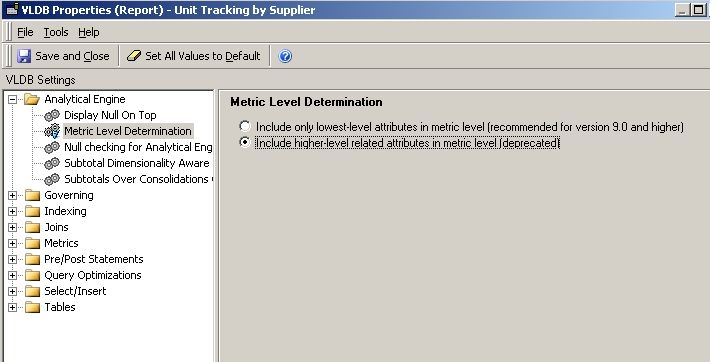
Several additional VLDB properties are introduced with Strategy 9.x. One of the options under Analytical Engine folder is called "Metric Level Determination." The default value here is "Include only lowest-level attribute in metric level (recommended for version 9.0 and higher).
 

ka02R000000g25HQAQ_0EM440000002Wwj.jpeg

 
The second option, "Include higher-level related attribute in metric level (deprecated)" should be used only when the report is affected by the issue discussed in following tech note:
 
KB417446  - Some metric values are repeated across rows when a report is executed in Strategy
 
This option is provided when the end goal is to adjust the schema design as explained in above Knowledge Base article.
 
More detailed explanation for this option can be found at:
 
System Administration Guide Vol. 1 > A. SQL Generation and Data Processing: VLDB Properties > Details for all VLDB properties > Displaying, evaluating, and ordering data: Analytical Engine > Metric Level Determination.


Comment

0 comments

Details

Knowledge Article

Published:

July 24, 2017

Last Updated:

August 27, 2019