EducationSoftwareStrategy.com
StrategyCommunity

Knowledge Base

Product

Community

Knowledge Base

TopicsBrowse ArticlesDeveloper Zone

Product

Download SoftwareProduct DocumentationSecurity Hub

Education

Tutorial VideosSolution GalleryEducation courses

Community

GuidelinesGrandmastersEvents
x_social-icon_white.svglinkedin_social-icon_white.svg
Strategy logoCommunity

© Strategy Inc. All Rights Reserved.

LegalTerms of UsePrivacy Policy
  1. Home
  2. Topics

KB34475: How to migrate security roles and security filters between projects in MicroStrategy Object Manager


Xiaokun Hou

Software Architect • MicroStrategy


KB34475: How to migrate security roles and security filters between projects in MicroStrategy Object Manager

Strategy Object Manager allows the linking of security roles and security filters to be migrated along with user/user group objects between metadatas. This document explains how to use the feature. To migrate the project related security access settings, please follow steps below.
Note: Starting in Strategy 2021 Update 2, you can also perform this functionality using the Packages REST APIs.
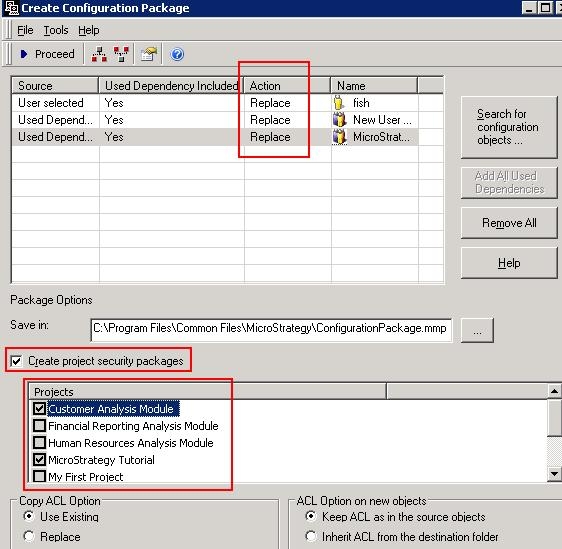

  • Launch Strategy Object Manager and connect to a project that is the migration source.
  • Create a configuration package with user and/or user group objects and set their Action to Replace.
    Note: We recommend you enable Add All Used Dependencies.
  • Select Create project security package and the projects to include in the security access settings.
     
ka04W000001IrKnQAK_0EM440000002DxZ.jpeg
  • Note: By selecting Create project security packages, a project security package is created along with the configuration package. The project security package includes links to security roles, security filters, connection mapping, profile folder link, and personal preferences that are related to the user and/or user group objects selected in the window above. Please be aware that security roles and security filters are not included. Security Filters need to be migrated prior using a project package; Security Roles need to be migrated prior using a Configuration Package. Only links are included.  
  • Click Proceed. One configuration package and two project security packages are created (one per selected project).
ka04W000001IrKnQAK_0EM440000002Dxb.jpeg
  • To apply the changes in the destination project, import the packages as follows:
    • Launch Strategy Object Manager and connect to the destination metadata.
    • Import the configuration package file.
    • Connect to each project and import the project security package files accordingly.

Comment

0 comments

Details

Knowledge Article

Published:

May 24, 2017

Last Updated:

June 30, 2021