EducationSoftwareStrategy.com
StrategyCommunity

Knowledge Base

Product

Community

Knowledge Base

TopicsBrowse ArticlesDeveloper Zone

Product

Download SoftwareProduct DocumentationSecurity Hub

Education

Tutorial VideosSolution GalleryEducation courses

Community

GuidelinesGrandmastersEvents
x_social-icon_white.svglinkedin_social-icon_white.svg
Strategy logoCommunity

© Strategy Inc. All Rights Reserved.

LegalTerms of UsePrivacy Policy
  1. Home
  2. Topics

KB34481: The Operator of View Filter is not displaying when switching to another Operator when Attribute and Metric qualification are set in MicroStrategy Developer 9.x


Stefan Zepeda

Salesforce Solutions Architect • Strategy


The Operator of View Filter is not displaying when switching to another Operator when Attribute and Metric qualification are set in MicroStrategy Developer 9.x

SYMPTOM:
When a attribute qualification and metric qualification are set in the view filter, the operator is not displaying when switching to another operation on Strategy Developer 9.x
 
STEP TO REPRODUCE:
Follow the steps below to reproduce the issue in the Strategy Tutorial project:
  • Create a report called ‘VFilter_operator’ with Category, SubCategory on the row, Revenue on the column then execute the report.
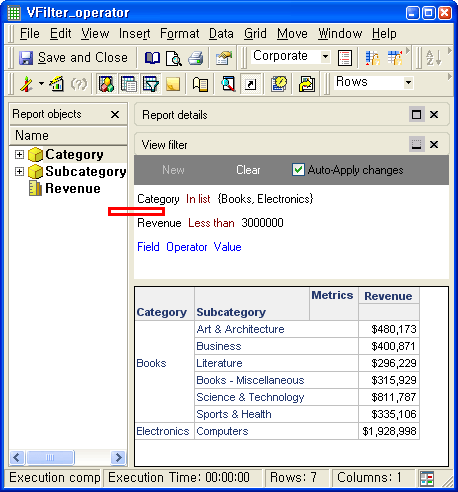
  • Add a view filter with Category in {Books, Electronics} and Revenue less than 3000000 and confirm that there is no operator as shown in the image below:
ka02R000000kY3FQAU_0EM440000002CcT.png
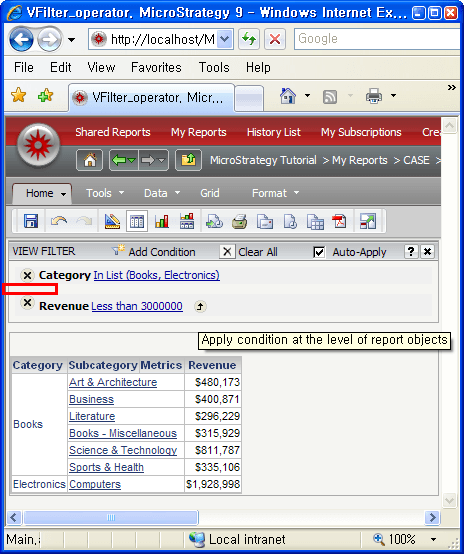
  • Note: Operator is not displaying either in Strategy Web 9.0.x as shown in the image below:
ka02R000000kY3FQAU_0EM440000002CcV.png

CAUSE:
This is a known issue with Strategy Developer 9.x 
 
ACTION:
Please contact Strategy Technical Support for an update.
 
WORKAROUND:
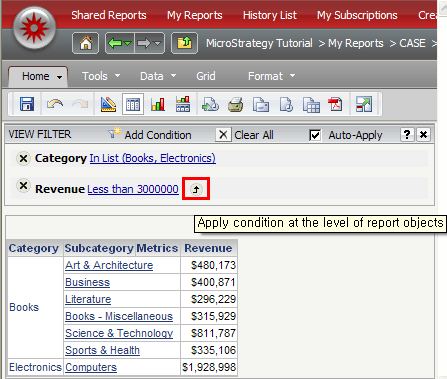
  • Execute ‘VFilter_Operator’ report on Strategy Web and click the arrow for which the tooltip is ‘Apply condition at the level of report objects’ then the AND operator is displayed and can be switched to another operator as shown in the image below: 
ka02R000000kY3FQAU_0EM440000002CcX.png
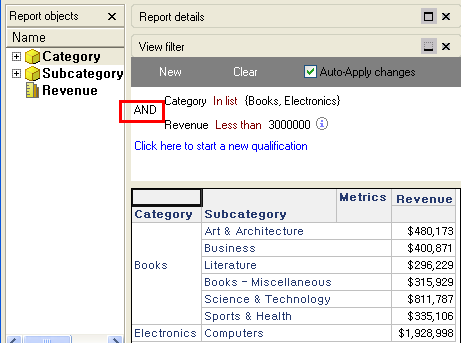
  • Once the operator is displaying in Strategy Web, then the operator displays too in Developer as shown in the image below:
ka02R000000kY3FQAU_0EM440000002CcR.png


Comment

0 comments

Details

Knowledge Article

Published:

June 12, 2017

Last Updated:

June 12, 2017