EducationSoftwareStrategy.com
StrategyCommunity

Knowledge Base

Product

Community

Knowledge Base

TopicsBrowse ArticlesDeveloper Zone

Product

Download SoftwareProduct DocumentationSecurity Hub

Education

Tutorial VideosSolution GalleryEducation courses

Community

GuidelinesGrandmastersEvents
x_social-icon_white.svglinkedin_social-icon_white.svg
Strategy logoCommunity

© Strategy Inc. All Rights Reserved.

LegalTerms of UsePrivacy Policy
  1. Home
  2. Topics

KB34483: ‘List All Groups’ script in MicroStrategy Command Manager 9.x returns only the English group name.


Community Admin

• Strategy


SYMPTOM:
Under a non-English Operating System environment, the ‘list all groups’ script returns only the English group name on Strategy Command Manager 9.x.
 
STEP TO REPRODICE:
Follow the steps below to reproduce the issue in the Strategy Tutorial project.
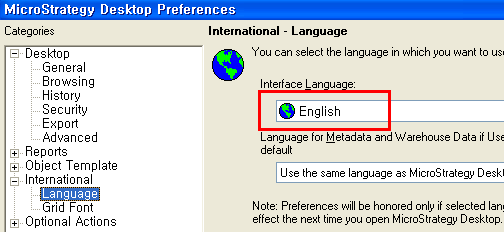
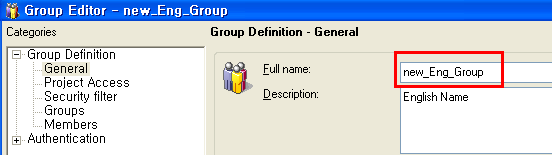
  • In Desktop with an English interface language, create a new group called 'new_Eng_Group' as shown in the image below:
ka04W000000OecTQAS_0EM4400000029W0.png
ka04W000000OecTQAS_0EM4400000029Vw.png
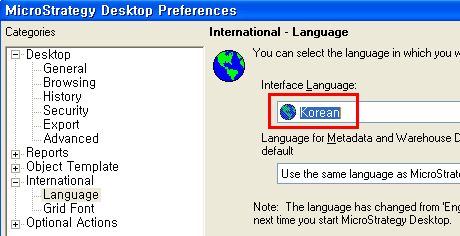
  • In Desktop with a Korean interface, change the group name to the Korean '한글그룹' as shown in the image below:
ka04W000000OecTQAS_0EM4400000029Vz.png
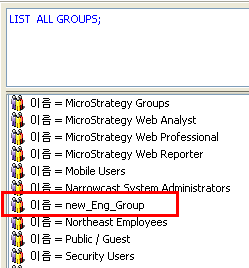
  • In Strategy Command Manager, perform the ‘LIST ALL GROUPS;’ script and confirm that only the English group name  ‘new_Eng_Group’ is returned and not not ‘한글그룹’ as shown in the image below:
ka04W000000OecTQAS_0EM4400000029WC.png

CAUSE:
This is a known issue with Strategy Command Manager 9.0.x on a non-English Operating System. 
 
ACTION:
Please contact Strategy Technical Support for an update.


Comment

0 comments

Details

Knowledge Article

Published:

June 8, 2017

Last Updated:

June 8, 2017