EducationSoftwareStrategy.com
StrategyCommunity

Knowledge Base

Product

Community

Knowledge Base

TopicsBrowse ArticlesDeveloper Zone

Product

Download SoftwareProduct DocumentationSecurity Hub

Education

Tutorial VideosSolution GalleryEducation courses

Community

GuidelinesGrandmastersEvents
x_social-icon_white.svglinkedin_social-icon_white.svg
Strategy logoCommunity

© Strategy Inc. All Rights Reserved.

LegalTerms of UsePrivacy Policy
  1. Home
  2. Topics

KB34484: The ‘Find’ field for searching for Attribute elements is not displaying for a prompt filter with a pre-defined list of attribute elements


Stefan Zepeda

Salesforce Solutions Architect • Strategy


The find for search attribute element is not displaying for a prompt filter with a pre-defined list of attribute elements in MicroStrategy Developer and MicroStrategy Web

SYMPTOM:
The find for search attribute element is not displaying for a prompt filter with a pre-defined list of attribute elements in Strategy Developer and Strategy Web.
 
STEP TO REPRODUCE:
Follow the steps below to explain the symptom in Strategy Developer:
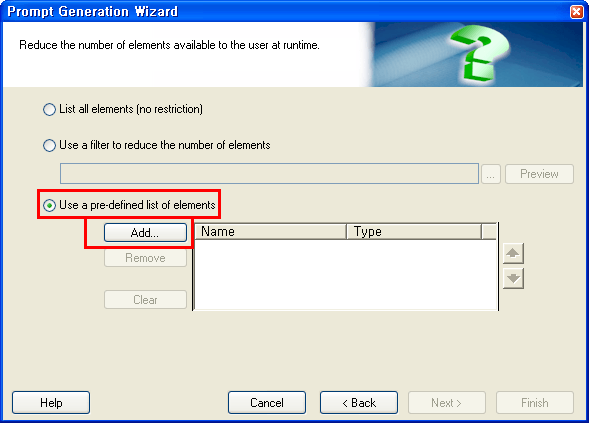
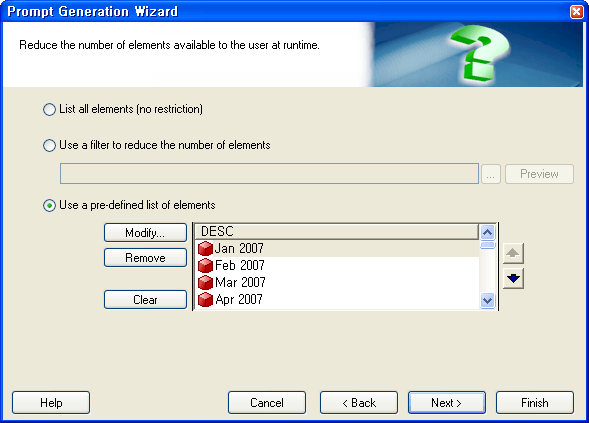
  • In Strategy Developer , create a Filter called ‘PreDef_month’ selecting ‘Use a pre-defined list of elements’ as shown in the image below:
ka02R000000kcUiQAI_0EM440000002CcL.png
ka02R000000kcUiQAI_0EM440000002Jar.png
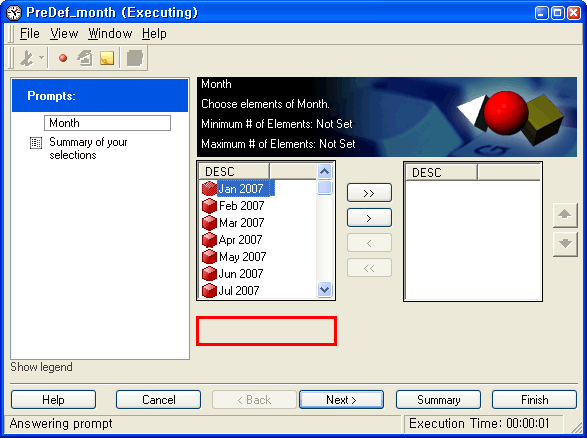
  • Create a report with Month in the row and ‘PreDef_month’ filter and execute.The ‘Find’ field is not displaying as shown in the image below:
ka02R000000kcUiQAI_0EM440000002CcP.png
  •  
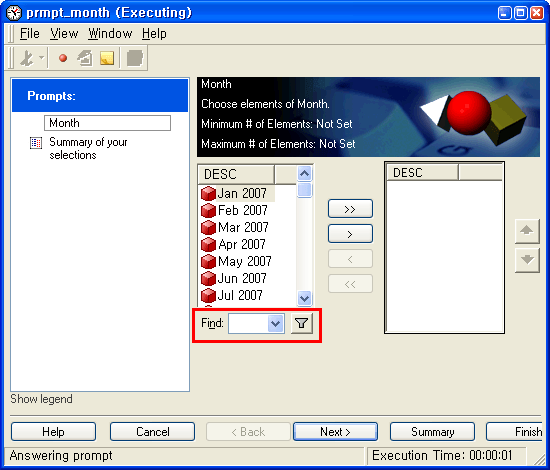
    Note: The following prompt filter with 'List all elements', as shown below, is helpful to understand the symptom:
ka02R000000kcUiQAI_0EM440000002CcJ.png

CAUSE:
This is working as designed. A pre-defined element prompt already has selected elements.


Comment

0 comments

Details

Knowledge Article

Published:

April 17, 2017

Last Updated:

April 17, 2017