EducationSoftwareStrategy.com
StrategyCommunity

Knowledge Base

Product

Community

Knowledge Base

TopicsBrowse ArticlesDeveloper Zone

Product

Download SoftwareProduct DocumentationSecurity Hub

Education

Tutorial VideosSolution GalleryEducation courses

Community

GuidelinesGrandmastersEvents
x_social-icon_white.svglinkedin_social-icon_white.svg
Strategy logoCommunity

© Strategy Inc. All Rights Reserved.

LegalTerms of UsePrivacy Policy
  1. Home
  2. Topics

KB34508: "Failed to start service. Unexpected error occurred. The service did not respond to the start or control request in a timely fashion" message appears when attempting to start Intelligence Server on Windows using Service Manager

Community Admin

• Strategy


The following knowledge base article describes one possible cause of the error "Failed to start service. Unexpected error occurred. The service did not respond to the start or control request in a timely fashion". A solution is provided.

SYMPTOM:
When attempting to start the Strategy Intelligence Server 9.x service via the Strategy Service Manager or Windows Services, the the following error occurs:


"Failed to start service. Unexpected error occurred. The service did not respond to the start or control request in a 
timely fashion"

 
However, the Strategy Intelligence Server is able to start as an application if the MSTRSvr executable is run directly from C:\Program Files\MicroStrategy\Intelligence Server.
 
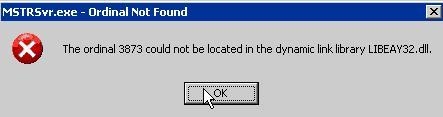
Additionally, if the full start command as specified in the Properties for the Strategy Intelligence Server service under Windows Services, is run to start the service directly in a command line terminal, the following errors are seen:


ka04W000000ObyHQAS_0EM440000002Aly.jpeg


The ordinal 3873 could not be located in the dynamic link library LIBEAY32.dll.
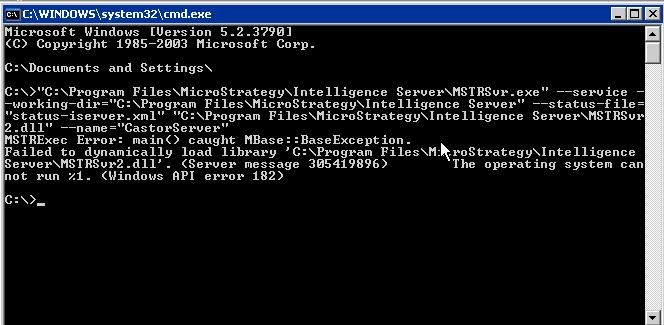
 

ka04W000000ObyHQAS_0EM440000002Alx.jpeg


Failed to dynamically load library 'C:\Program Files\MicroStrategy\Intelligence Server\MSTRSvr2.dll'. (Server message 305419896)
The operating system cannot run %1. (Windows API error 182)
 
CAUSE:
This issue occurs when the Strategy Intelligence Server machine has multiple versions of the LIBEAY32.dll file and the path environment variable is configured to search in other folders before searching C:\Program Files\Common Files\Strategy where the Strategy DLLs are located. Thus the incorrect DLL is found by MSTRSvr.exe and the service startup fails. 
 
ACTION:

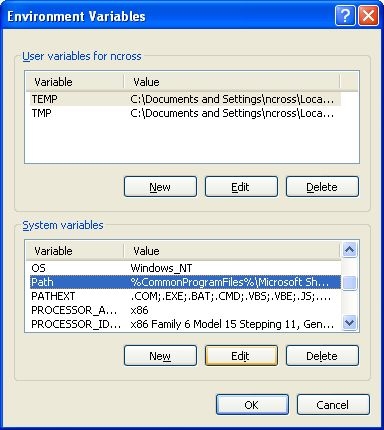
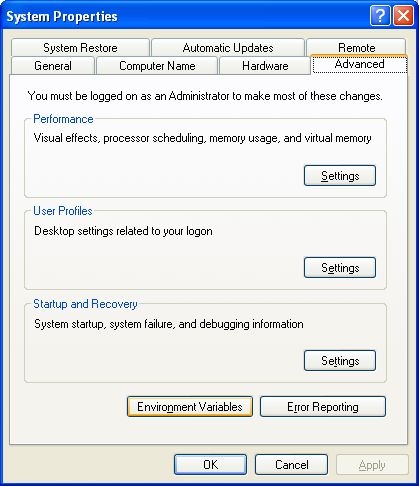
  • From the Start Menu, right mouse click on My Computer (Windows 2003 and Windows XP) or Computer (Windows Server 2008, Windows Vista, Windows 7) and select Properties > Advanced > Environment Variables.
     
ka04W000000ObyHQAS_0EM440000002Alu.jpeg
  • Locate the variable called Path and click Edit.
ka04W000000ObyHQAS_0EM440000002Alw.jpeg
  • Copy and paste the value for path into a text file.
  • Move the entry for C:\Program Files\Common Files\Strategy so it appears before the folder for any other applications.
  • Copy the value back into the editor for the Path environment variable and click OK.
  • Click OK to exit the environment variables interface.
  • The Intelligence Server should now be able to start normally as a service using Service Manager or Windows Services.

Comment

0 comments

Details

Knowledge Article

Published:

May 31, 2017

Last Updated:

May 31, 2017