EducationSoftwareStrategy.com
StrategyCommunity

Knowledge Base

Product

Community

Knowledge Base

TopicsBrowse ArticlesDeveloper Zone

Product

Download SoftwareProduct DocumentationSecurity Hub

Education

Tutorial VideosSolution GalleryEducation courses

Community

GuidelinesGrandmastersEvents
x_social-icon_white.svglinkedin_social-icon_white.svg
Strategy logoCommunity

© Strategy Inc. All Rights Reserved.

LegalTerms of UsePrivacy Policy
  1. Home
  2. Topics

KB34514: In MicroStrategy Developer 9.x, the option to ‘Purge all element caches’ is grayed out when updating schema.


Stefan Zepeda

Salesforce Solutions Architect • Strategy


In MicroStrategy Developer 9.x, the option to ‘Purge all element caches’ is grayed out when updating schema.

SYMPTOM:
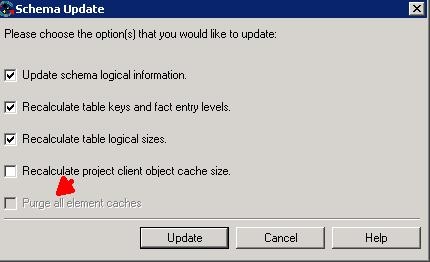
In Strategy Developer 9.x, when the schema is updated, the option to ‘Purge all element caches’ is grayed out:
 

ka02R000000kYT2QAM_0EM440000002Dxj.jpeg


CAUSE:
The user is missing the 'Purge all element cache' privilege.
 
ACTION:
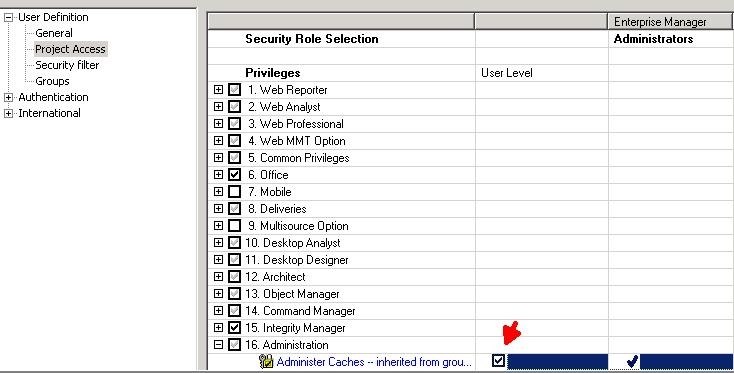
The privilege that disables the 'Purge all element caches' is located under Administration-> Administer caches.  Edit the user and go to Project Access-> Administration-> Administer caches.  Make sure this privilege is granted to the user updating schema.
  

ka02R000000kYT2QAM_0EM440000002Dxd.jpeg


Comment

0 comments

Details

Knowledge Article

Published:

June 8, 2017

Last Updated:

June 8, 2017