SYMPTOM:
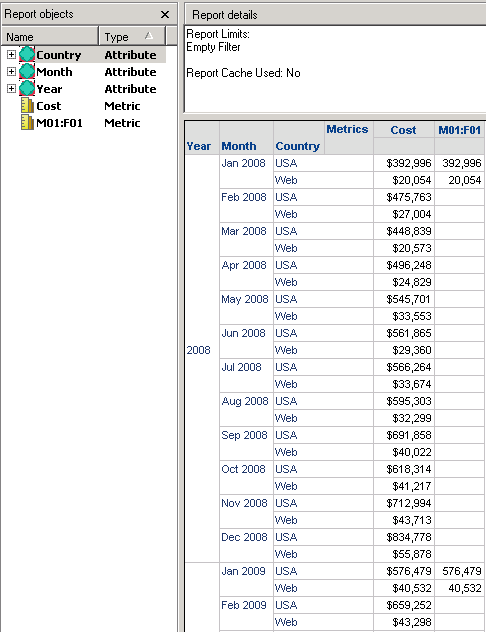
Attribute descriptions are missing or null for several rows on a report when they have valid descriptions in the database.
This issue can be seen when a conditional metric is outer joined with a non conditional metric in a report using the attribute and attribute form selection setting for intermediate passes.
The report will display descriptions for attribute elements that lie within the conditionality of the filtered metric but not for those that do not lie within the filter as shown below:
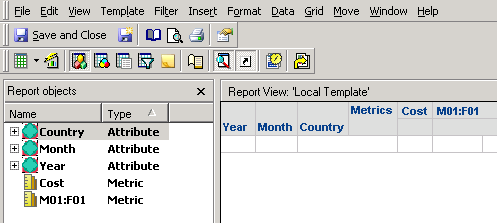
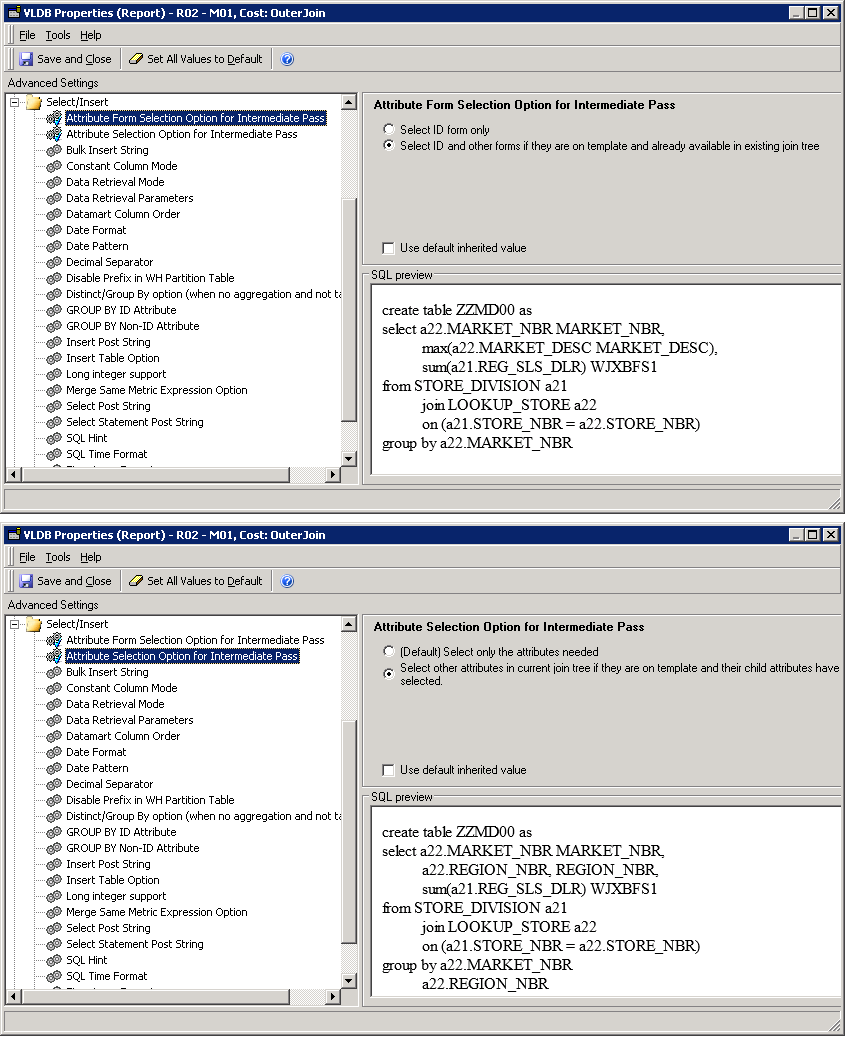
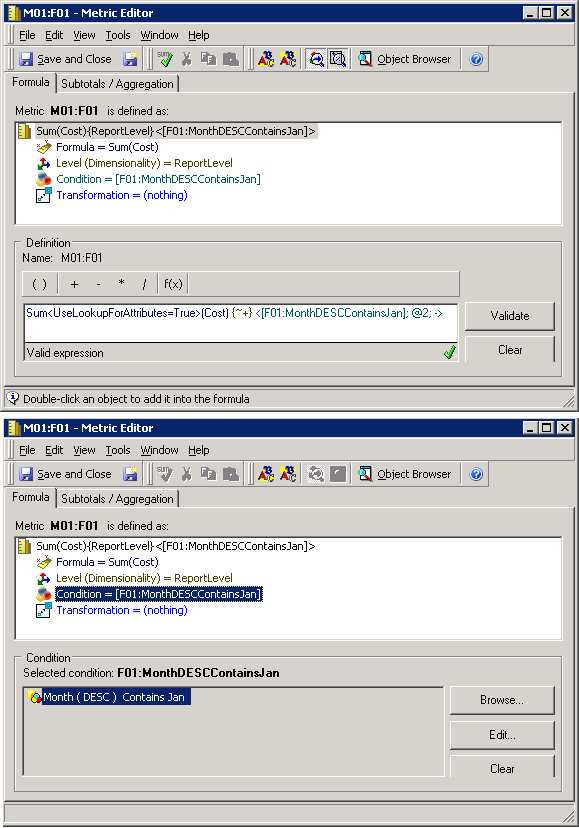
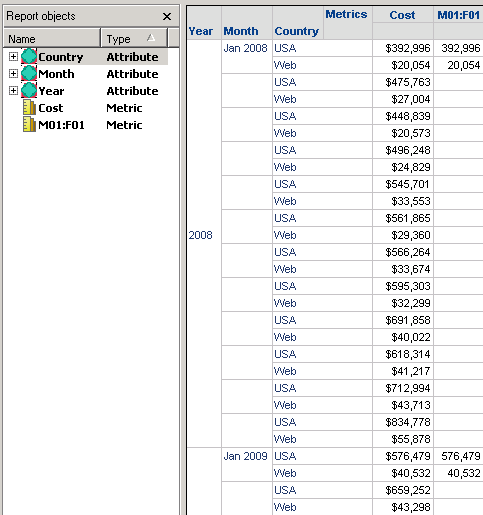
In the SQL the filtered metric pass will select the attribute description but pass for the unfiltered metric will not. The final pass will only select the description from the first intermediate pass as demonstrated in the SQL below.
SQL:
create table ZZMD00 nologging as
select a13.MONTH_ID MONTH_ID_INT,
a12.COUNTRY_ID COUNTRY_ID,
a13.YEAR_ID YEAR_ID_2,
sum(a11.TOT_COST) WJXBFS1
from DAY_CTR_SLS a11
join LU_CALL_CTR a12
on (a11.CALL_CTR_ID = a12.CALL_CTR_ID)
join LU_DAY a13
on (a11.DAY_DATE = a13.DAY_DATE)
group by a13.MONTH_ID,
a12.COUNTRY_ID,
a13.YEAR_ID
create table ZZMD01 nologging as
select a13.MONTH_ID MONTH_ID_INT,
a14.MONTH_DESC MONTH_DESC,
a12.COUNTRY_ID COUNTRY_ID,
a13.YEAR_ID YEAR_ID_2,
sum(a11.TOT_COST) WJXBFS1
from DAY_CTR_SLS a11
join LU_CALL_CTR a12
on (a11.CALL_CTR_ID = a12.CALL_CTR_ID)
join LU_DAY a13
on (a11.DAY_DATE = a13.DAY_DATE)
join LU_MONTH a14
on (a13.MONTH_ID = a14.MONTH_ID)
where a14.MONTH_DESC like N'%Jan%'
group by a13.MONTH_ID,
a14.MONTH_DESC,
a12.COUNTRY_ID,
a13.YEAR_ID
select coalesce(pa11.YEAR_ID_2, pa12.YEAR_ID_2) YEAR_ID_2,
coalesce(pa11.MONTH_ID_INT, pa12.MONTH_ID_INT) MONTH_ID_INT,
pa12.MONTH_DESC MONTH_DESC,
coalesce(pa11.COUNTRY_ID, pa12.COUNTRY_ID) COUNTRY_ID,
a13.COUNTRY_NAME CUST_COUNTRY_DESC,
pa11.WJXBFS1 WJXBFS1,
pa12.WJXBFS1 WJXBFS2
from ZZMD00 pa11
full outer join ZZMD01 pa12
on (pa11.COUNTRY_ID = pa12.COUNTRY_ID and
pa11.MONTH_ID_INT = pa12.MONTH_ID_INT)
join LU_COUNTRY a13
on (coalesce(pa11.COUNTRY_ID, pa12.COUNTRY_ID) = a13.COUNTRY_ID)
drop table ZZMD00 purge
drop table ZZMD01 purge
Note: This SQL doesn't return all the necessary Month descriptions leading to nulls being displayed on the report.
CAUSE:
This is a known issue with SQL generation when using filtered outer join metrics and the attribute/attribute form selection option for intermediate pass VLDB properties.
ACTION:
This issue has been fixed in Strategy 10.11.
If you are upgrading to Strategy 11.0 or above, to pick up the fix, enable project level setting "Data Engine Version" to 11. This property can only be enabled through Workstation. For more details on enabling the setting, refer to Change Data Engine Version.
If you are upgrading to Strategy 10.9 / 10.10 / 10.11: To pick up the fix, enable the Feature Flag "Defect fixes that may impact Data, SQL, MDX, CSI" within the Web Preferences -> Project Defaults. For more details on enabling Feature Flags refer to What are the Feature Flag options and what do they accomplish in MicroStrategy Web 10.8 and up. Starting Strategy 11.0, this Feature Flag is removed and replaced with project level setting called "Data Engine Version".
SQL:
create table ZZMD00 nologging as
select a13.MONTH_ID MONTH_ID_INT,
a12.COUNTRY_ID COUNTRY_ID,
a13.YEAR_ID YEAR_ID_2,
sum(a11.TOT_COST) WJXBFS1
from DAY_CTR_SLS a11
join LU_CALL_CTR a12
on (a11.CALL_CTR_ID = a12.CALL_CTR_ID)
join LU_DAY a13
on (a11.DAY_DATE = a13.DAY_DATE)
group by a13.MONTH_ID,
a12.COUNTRY_ID,
a13.YEAR_ID
create table ZZMD01 nologging as
select a13.MONTH_ID MONTH_ID_INT,
a14.MONTH_DESC MONTH_DESC,
a12.COUNTRY_ID COUNTRY_ID,
a13.YEAR_ID YEAR_ID_2,
sum(a11.TOT_COST) WJXBFS1
from DAY_CTR_SLS a11
join LU_CALL_CTR a12
on (a11.CALL_CTR_ID = a12.CALL_CTR_ID)
join LU_DAY a13
on (a11.DAY_DATE = a13.DAY_DATE)
join LU_MONTH a14
on (a13.MONTH_ID = a14.MONTH_ID)
where a14.MONTH_DESC like N'%Jan%'
group by a13.MONTH_ID,
a14.MONTH_DESC,
a12.COUNTRY_ID,
a13.YEAR_ID
select coalesce(pa11.YEAR_ID_2, pa12.YEAR_ID_2) YEAR_ID_2,
coalesce(pa11.MONTH_ID_INT, pa12.MONTH_ID_INT) MONTH_ID_INT,
a14.MONTH_DESC MONTH_DESC,
coalesce(pa11.COUNTRY_ID, pa12.COUNTRY_ID) COUNTRY_ID,
a13.COUNTRY_NAME CUST_COUNTRY_DESC,
pa11.WJXBFS1 WJXBFS1,
pa12.WJXBFS1 WJXBFS2
from ZZMD00 pa11
full outer join ZZMD01 pa12
on (pa11.COUNTRY_ID = pa12.COUNTRY_ID and
pa11.MONTH_ID_INT = pa12.MONTH_ID_INT)
join LU_COUNTRY a13
on (coalesce(pa11.COUNTRY_ID, pa12.COUNTRY_ID) = a13.COUNTRY_ID)
join LU_MONTH a14
on (coalesce(pa11.MONTH_ID_INT, pa12.MONTH_ID_INT) = a14.MONTH_ID)
drop table ZZMD00 purge
drop table ZZMD01 purge
WORKAROUND:
There are two available workarounds:
Strategy reference numbers for this technical note are KB34566 and US7669.
