EducationSoftwareStrategy.com
StrategyCommunity

Knowledge Base

Product

Community

Knowledge Base

TopicsBrowse ArticlesDeveloper Zone

Product

Download SoftwareProduct DocumentationSecurity Hub

Education

Tutorial VideosSolution GalleryEducation courses

Community

GuidelinesGrandmastersEvents
x_social-icon_white.svglinkedin_social-icon_white.svg
Strategy logoCommunity

© Strategy Inc. All Rights Reserved.

LegalTerms of UsePrivacy Policy
  1. Home
  2. Topics

KB34659: "You do not have Use access to the GraphStyle object 'VerticalLine (9.0.1)'" error message appears when saving a graph report in MicroStrategy Developer 2021


Stefan Zepeda

Salesforce Solutions Architect • Strategy


This technical note outlines an issue that occurs when trying to save a graph report in MicroStrategy 2021.

SYMPTOM:
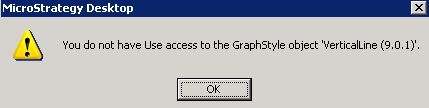
When the user performs copy/paste or save actions to a graph report, the following error occurs:
 

ka0PW000000157JYAQ_0EM440000002Dx3.jpeg


You do not have Use access to the GraphStyle object 'VerticalLine (9.0.1)'.
 
This error does not happen to any user account with the bypass security (ACL) privilege.
 
CAUSE:
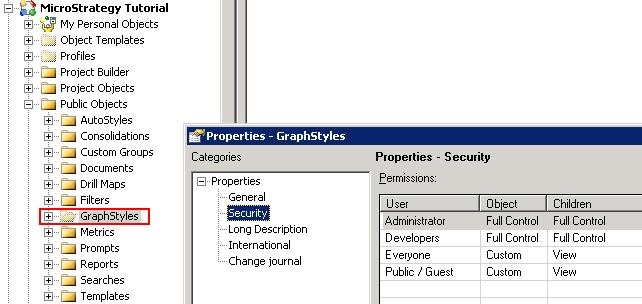
In Strategy 2021, there is a hidden folder called "GraphStyles" stored under "Public Objects" folder. By default, the ACL is configured as below:
 

ka0PW000000157JYAQ_0EM440000002Dwz.jpeg

 
If the Everyone group with View access is removed from the ACL for "Children", the error occurs.
 
ACTION:
This issue can be resolved by adding the Everyone group with View access to "Children" back into the ACL of the "GraphStyles" folder.


Comment

0 comments

Details

Knowledge Article

Published:

June 16, 2017

Last Updated:

March 4, 2024