Using Strategy, it is possible to define a search that returns a list of objects that are contained in multiple documents. To create this type of search using Strategy Desktop 9.3.1, perform the following steps:
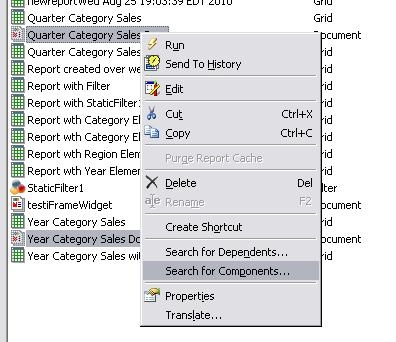
1. Select multiple documents in Desktop, by holding down the CTRL key and clicking multiple Documents. Right-click and click the option 'Search for Components':
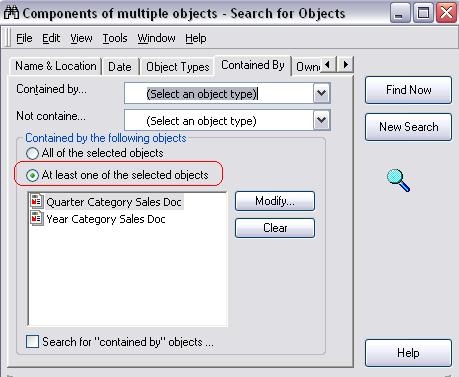
2. If all the expected elements did not return, switch to the 'Contained By' tab and select the option 'At least one of the selected objects' as shown below:
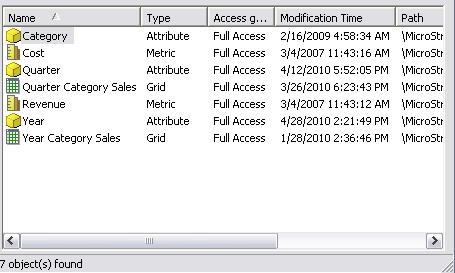
3. Click Find now and the expected objects are returned:
It is also possible to do this programmatically using the Strategy Intelligence Server SDK 9.3.1. To achieve the same result using the SDK, use the following code snippet:
Dim mySearch As IDSSSearch
Dim myResult As IDSSFolder
Dim oInfo As IDSSObjectInfo
Dim doc1 As IDSSObjectInfo5
Dim doc2 As IDSSObjectInfo5
Set MySource = MySession.Component(DssRoleObjectSource)
Set doc1 = MySource.FindObject("FD14642A46779B8DB6229AA225F339E9", DssTypeDocumentDefinition)
Set doc2 = MySource.FindObject("60E8E33C499F4D6DB59EA3AEE6F4122C", DssTypeDocumentDefinition)
Dim ofolder As IDSSFolder
Set mySearch = MySource.NewObject(DssTypeSearch)
mySearch.UsedBy.Add doc1
mySearch.UsedBy.Add doc2
' the following flag must be set. this flag represents the option 'At least one of the selected objects' in the GUI interface.
mySearch.Flags = DssSearchUsedByOneOf
Set myResult = mySearch.Execute
For Each oInfo In myResult
debug.print "name: " & oInfo.Name
Next
End Sub
CUSTOMIZATION WARNING:
This customization is provided as a convenience to Strategy users and is only directly applicable to the version stated. While this code may apply to other releases directly, Strategy Technical Support makes no guarantees that the code provided will apply to any future or previous builds. In the event of a code change in future builds, Strategy Technical Support makes no guarantee that an updated version of this particular customization will be provided. In the event of a code change in future builds, Strategy may not be able to provide additional code on this matter even though this customization is provided at this time for this specific build. For enhancements to this customization or to incorporate similar functionality into other versions, contact your Account Executive to inquire about Strategy Consulting assistance.
