SYMPTOM:
When a user attempts to create any schema object by right clicking in an appropriate folder (fact, attribute etc...) whole section containing the schema objects is grayed-out.
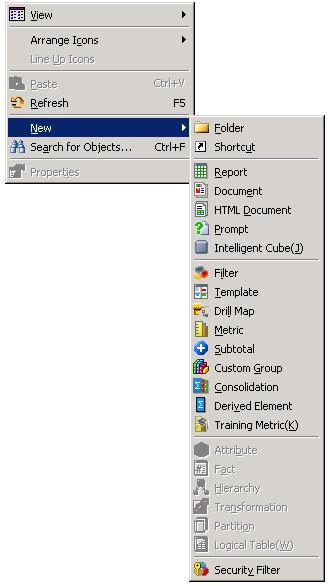
Also, there is no possibility to modify existing schema objects as the save / save as options are disabled:

CAUSE:
There are two possible causes for this issue:
1) User does not have appropriate privileges assigned.
2) Read Only mode is enabled for the project.
ACTION:
Missing privileges should be assigned to the user or the Read Only mode should be disabled. In order to disable the Read Only mode while being logged in to a project go to : Schema -> Read Only mode and make sure the option in unchecked

