SYMPTOM:
Users using Strategy 10.x, observe that dynamic sourcing does not appear to work if the Intelligent Cube contains a metric with implicit degradation even if the fact does not have any extensions introduced through the Fact Editor.
For example:
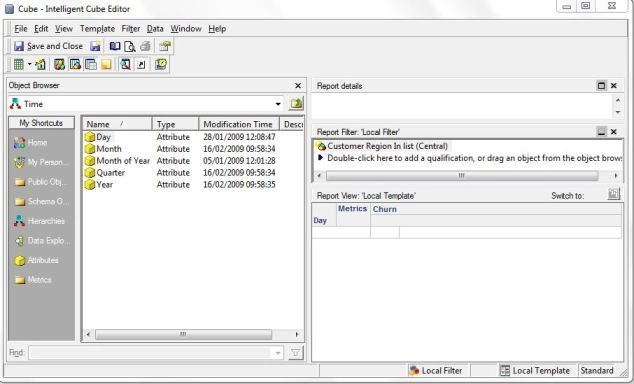
Intelligent Cube template:
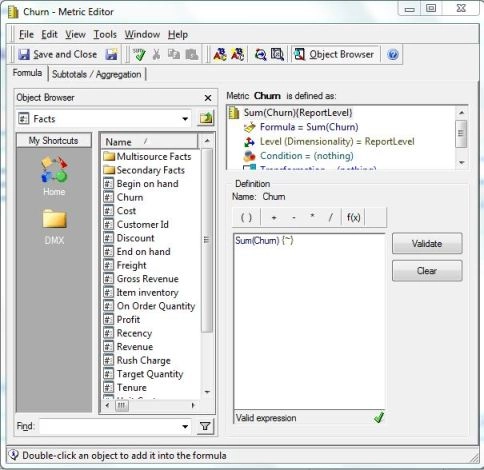
Definition of metric in the Intelligent Cube:
Entry level of the fact used in the "Churn" metric:
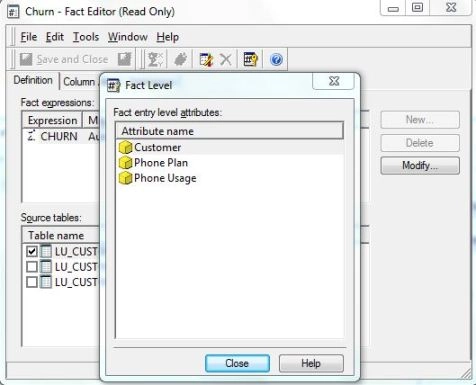
Note that the attribute used in the template of the Intelligent Cube is not compatible with the Fact entry level of the metric used in the template.
If Dynamic Sourcing is enabled for this particular Intelligent Cube and then it is published, the user will see a message as follows:
CubeName: <Cube>
Intelligent Cube is ineligible for Dynamic Sourcing
MEM USAGE INFO buffer before: 160 KB, buffer after: 160 KB, difference: 0 KB
RUN TIME INFO cube parse time: 0 milliseconds
CMI_ALL_METRICS_REMOVED_FROM_CUBE
The following metric(s) will not be available for dynamic sourcing
Failed Parsing metric with name: <metric>
Error code: CMI_FACT_ENTRY_LVL_ERROR
CAUSE:
Implicit degradation occurs when the Intelligent cube report level is not compatible with the fact level of any metric being used in the Intelligent Cube (Fact Editor > Tools > Show Fact Entry Level) so a cross join between the fact table and the report level attribute is needed resulting in a fact extension and disabling Dynamic Sourcing for that specific Intelligent Cube.
ACTION:
Verify that all metrics in the template of the Intelligent Cube use facts that have a level which is a subset of the report level in the Intelligent Cube.
If any fact used has a fact level not compatible with the report level in the Intelligent Cube then a related attribute to the fact entry level has to be added in the Intelligent Cube so both levels become compatible.
