SYMPTOM:
When subscribing to a Send Now or email subscription in Strategy Web 9.4.1 -10.x the confirmation window appears:
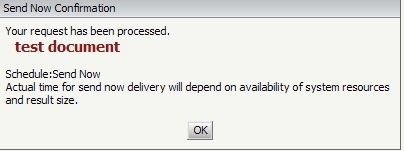
However, the recipient of the subscription does not receive the email in his/her inbox. Checking the Scheduler Trace shows that the subscription appeared to send:
Sample Code/Error
2010-11-02 13:36:22.416-05:00 Distribution Service Delivery: Entering delivery for delivery number 9.
2010-11-02 13:36:22.588-05:00 Distribution Service Delivery: Delivery finished for delivery number 9: delivery count so far = 9.
Looking into the standard SMTP Sender Trace shows that the email subscription was sent successfully:
Sample Code/Error
2010-11-02 13:36:13.619-05:00 Local machine domain: HOST
2010-11-02 13:36:13.650-05:00 Processing destination domain: Strategy.com
2010-11-02 13:36:13.666-05:00 Connecting to domain: Strategy.com
2010-11-02 13:36:13.681-05:00 Connecting to ip address: 641.514.702.421
2010-11-02 13:36:13.681-05:00 Establishing handshake via Hello on domain: Strategy.com
2010-11-02 13:36:13.744-05:00 Checking recipients
2010-11-02 13:36:13.775-05:00 Recipient address example@Strategy.com accepted
2010-11-02 13:36:13.791-05:00 Sending email
2010-11-02 13:36:13.838-05:00 Email sent. Waiting for acknowledge
2010-11-02 13:36:13.853-05:00 Email send acknowledged
Turning on the SMTP Verbose Packet Trace also shows the email has been sent successfully:
Sample Code/Error
2010-11-02 13:36:13.744-05:00 Sent 52 bytes, Local address: 476.774.894.664 (2832), Remote address: 641.514.702.421 (25), data: MAIL FROM:<>
2010-11-02 13:36:13.744-05:00 Received 63 bytes, Local address: 476.774.894.664 (2832), Remote address: 641.514.702.421 (25), data: 250 2.1.0 ....Sender OK
2010-11-02 13:36:13.759-05:00 Sent 38 bytes, Local address: 476.774.894.664 (2832), Remote address: 641.514.702.421 (25), data: RCPT TO:<example@Strategy.com>
2010-11-02 13:36:13.775-05:00 Received 39 bytes, Local address: 476.774.894.664 (2832), Remote address: 641.514.702.421 (25), data: 250 2.1.5 example@Strategy.com
2010-11-02 13:36:13.791-05:00 Sent 6 bytes, Local address: 476.774.894.664 (2832), Remote address: 641.514.702.421 (25), data: DATA
2010-11-02 13:36:13.806-05:00 Received 46 bytes, Local address: 476.774.894.664 (2832), Remote address: 641.514.702.421 (25), data: 354 Start mail input; end with <CRLF>.<CRLF>
2010-11-02 13:36:13.806-05:00 Sent 8192 bytes, Local address: 476.774.894.664 (2832), Remote address: 641.514.702.421 (25), data: MIME-Version: 1.0
From:
=?utf-8?Q?=22Strategy=20Distribution=20Services=22?= <>
Reply-To:
<div class=3Dxl=
28 style=3D'overflow:hidden; position:relative; border:none;height:504pt;'>=
=0A <!-- Start of panel stack--><span class=3Dxl30 style=3D'overflow: hidde=
n; position:absolute; top:18pt; left:18pt; z-index:1; width:684pt; height:4=
68pt;
2010-11-02 13:36:13.822-05:00 Sent 5 bytes, Local address: 476.774.894.664 (2832), Remote address: 641.514.702.421 (25), data:
.
2010-11-02 13:36:13.838-05:00 Received 38 bytes, Local address: 476.774.894.664 (2832), Remote address: 641.514.702.421 (25), data: 250 2.6.0 Queued mail for delivery
2010-11-02 13:36:13.853-05:00 Sent 6 bytes, Local address: 476.774.894.664 (2832), Remote address: 641.514.702.421 (25), data: QUIT
CAUSE:
If the Strategy traces show that the email was sent then the problem is generally not with the Strategy product, instead the issue will be either with the network, mail relay server, or end client SMTP server. The reasons for problems to occur at any of these points are too numerous to cover in a single technical note. In general, if the Strategy trace says the email was sent then the client / host SMTP and network teams should be involved to determine a root cause.
One such possible root cause is that either the mail relay server or the end client SMTP server have some form of security or authentication that requires a non-empty sender field in the email. Checking the verbose trace log the following line can be found:
Sample Code/Error
2010-11-02 13:36:13.744-05:00 Sent 52 bytes, Local address: 476.774.894.664 (2832), Remote address: 641.514.702.421 (25), data: MAIL FROM:<>
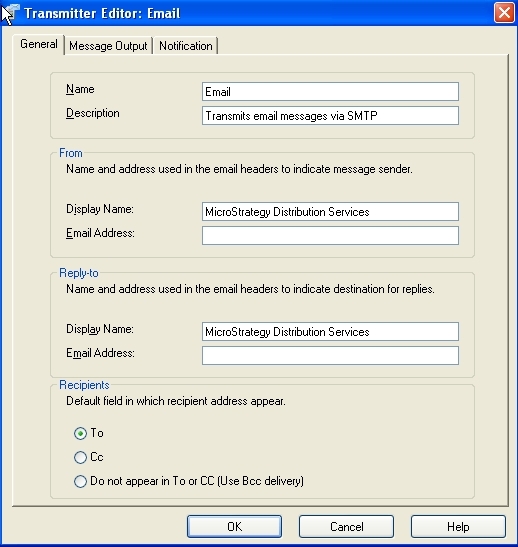
Here it is clear that the "MAIL FROM" field is blank. This field is populated by the corresponding 'From > Email Address' field in the email transmitter object in the Strategy metadata:
ACTION:
Set the From and Reply-to for the email transmitter in the Transmitter Editor in Strategy Desktop 9.4.1 - Developer 10.x . Under the project source, go to Administrator >Delivery Managers > Transmitters > right click email and select Edit and fill in the email address.

