EducationSoftwareStrategy.com
StrategyCommunity

Knowledge Base

Product

Community

Knowledge Base

TopicsBrowse ArticlesDeveloper Zone

Product

Download SoftwareProduct DocumentationSecurity Hub

Education

Tutorial VideosSolution GalleryEducation courses

Community

GuidelinesGrandmastersEvents
x_social-icon_white.svglinkedin_social-icon_white.svg
Strategy logoCommunity

© Strategy Inc. All Rights Reserved.

LegalTerms of UsePrivacy Policy
  1. Home
  2. Topics

KB34886: “Syntax error (missing operator) in query expression” error is received when running Query Builder reports against a text file data source in MicroStrategy Developer 9.4.1


Stefan Zepeda

Salesforce Solutions Architect • Strategy


“Syntax error (missing operator) in query expression” error is received when running Query Builder reports against a text file data source in MicroStrategy Developer 9.4.1

SYMPTOM:
When executing a report against a text file data source, the following error occurs:
"Syntax error (missing operator) in query expression"
CAUSE:
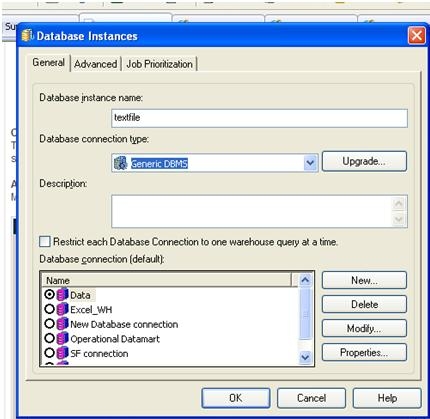
Users experience this issue because the Database Instance type is set as Generic.  The Generic Database Instance type will generate SQL that does not include “AS” in the syntax when assigning column aliases. 
ka02R000000kYciQAE_0EM440000002JHF.jpeg

ACTION:
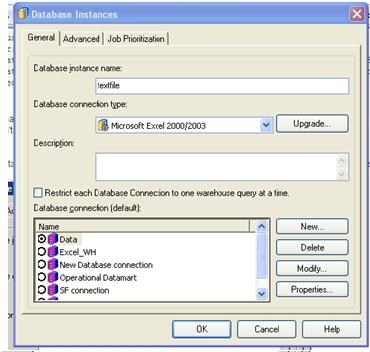
Change the Database Instance type from Generic DBMS to Microsoft Excel 2000/2003.This Database Instance type will include “AS” in the column aliases.
ka02R000000kYciQAE_0EM440000002JHG.jpeg

Comment

0 comments

Details

Knowledge Article

Published:

June 6, 2017

Last Updated:

June 6, 2017