EducationSoftwareStrategy.com
StrategyCommunity

Knowledge Base

Product

Community

Knowledge Base

TopicsBrowse ArticlesDeveloper Zone

Product

Download SoftwareProduct DocumentationSecurity Hub

Education

Tutorial VideosSolution GalleryEducation courses

Community

GuidelinesGrandmastersEvents
x_social-icon_white.svglinkedin_social-icon_white.svg
Strategy logoCommunity

© Strategy Inc. All Rights Reserved.

LegalTerms of UsePrivacy Policy
  1. Home
  2. Topics

KB34916: How to display the number of individual items in a derived element?


Community Admin

• Strategy


How to display the number of individual items in a derived element?

When users are creating a derived element, it is very important for them to know how many elements are included in each derived element. The final report can look like this:
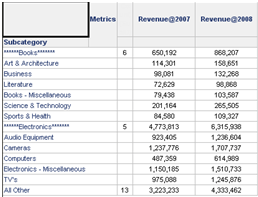
 

ka04W000000uGCjQAM_0EM440000002DtK.png

 
Below you can find an example to create this feature using Strategy Developer 9.x and Strategy Tutorial Project.
 

  1. Create “Year2007” filter.
    Year in list(2007)
  2. Create “Year2008” filter.
    Year in list(2008)
  3. Create “Revenue@2007” metric
    Formula:              Sum(Revenue)
    Condition:          
  4. Create “Revenue@2008” metric
    Formula:              Sum(Revenue)
    Condition:          
  5. Create “NumOfElements” metric. This metric will be use to create the number of individual items in the derived element.
    Count(Max(Subcategory@ID) {Report Level}) {Report Level}
  6. Create an Intelligent cube (ICube1) with “Subcategory” and the metrics created in step 3, 4 and 5.
  7. Create a View Report from the Intelligent Cube (ICube1) using all the objects from the cube.
ka04W000000uGCjQAM_0EM440000002DtC.png


8.       Create Derived Elements for Books and Electronics. In this case you should create the elements twice because one will be use to display the total number of individual items.
a.        “ *****Books*****” should contain all books subcategories and select “Consolidate items into one element” setting on the Element behavior property.
b.       “New List” should contain all books subcategories and select “Keep individual items separate” setting on the Element behavior property.
 

ka04W000000uGCjQAM_0EM440000002DtD.png

 
 9.    Adjust the column width, hide the title for “NumOfElements” metric and use thresholds to hide the values for all the individual items in the Derived element, and the final report should look like this:


ka04W000000uGCjQAM_0EM440000002DtF.png


KB34916


Comment

0 comments

Details

Knowledge Article

Published:

June 8, 2017

Last Updated:

December 31, 2018