EducationSoftwareStrategy.com
StrategyCommunity

Knowledge Base

Product

Community

Knowledge Base

TopicsBrowse ArticlesDeveloper Zone

Product

Download SoftwareProduct DocumentationSecurity Hub

Education

Tutorial VideosSolution GalleryEducation courses

Community

GuidelinesGrandmastersEvents
x_social-icon_white.svglinkedin_social-icon_white.svg
Strategy logoCommunity

© Strategy Inc. All Rights Reserved.

LegalTerms of UsePrivacy Policy
  1. Home
  2. Topics

KB34949: "Merge Row Header Cells" is not being applied when using a Narrowcast Excel Document in MicroStrategy Narrowcast


Community Admin

• Strategy


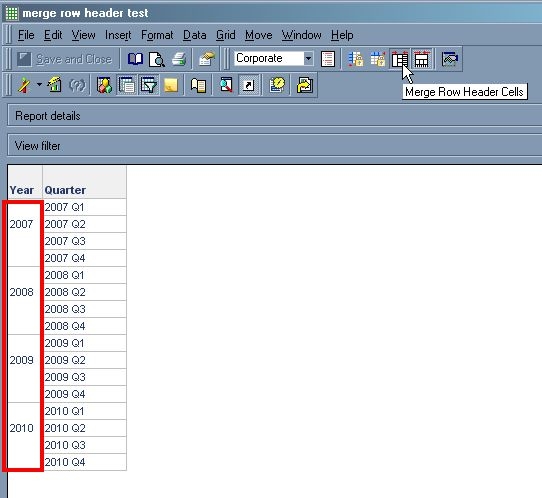
"Merge Row Header Cells' option allows users to specify that the rows with repeated values should be merged, so that the value can be displayed only once in the center of the merged cells as shown below.
SYMPTOM:
"Merge Row Header Cells" option allows users to specify that the rows with repeated values should be merged, so that the value can be displayed only once in the center of the merged cells as shown below.

ka04W000000ObMcQAK_0EM440000002Al9.jpeg

 
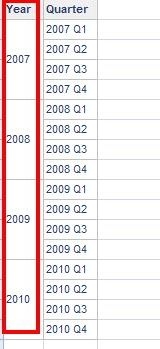
After the report is defined in this way, the export to Excel from Developer also shows the rows merged properly.
ka04W000000ObMcQAK_0EM440000002Al6.jpeg

 
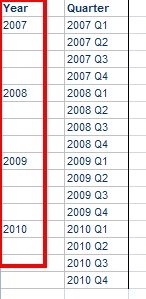
However, when the same report is delivered as Narrowcast Excel document, the cells are not merged:
ka04W000000ObMcQAK_0EM440000002Al8.jpeg

 
CAUSE:
This is a known issue with Strategy Narrowcast.
 
ACTION:
Currently this issue is not scoped for any upcoming scheduled release.
 
WORKAROUND:
Use a Narrowcast Linked Document instead of a Narrowcast Document.


Comment

0 comments

Details

Knowledge Article

Published:

June 2, 2017

Last Updated:

June 2, 2017