EducationSoftwareStrategy.com
StrategyCommunity

Knowledge Base

Product

Community

Knowledge Base

TopicsBrowse ArticlesDeveloper Zone

Product

Download SoftwareProduct DocumentationSecurity Hub

Education

Tutorial VideosSolution GalleryEducation courses

Community

GuidelinesGrandmastersEvents
x_social-icon_white.svglinkedin_social-icon_white.svg
Strategy logoCommunity

© Strategy Inc. All Rights Reserved.

LegalTerms of UsePrivacy Policy
  1. Home
  2. Topics

KB34955: How to use pre/post-sql to cascade service execution in MicroStrategy Narrowcast Server


Community Admin

• Strategy


The solution in this technical note outlines how to use pre/post-sql to cascade service execution in MicroStrategy Narrowcast Server. For example, there are two services "s1" and "s2". The requirement is to make "s2" wait on the completion of "s1" before execution.

The solution in this technical note outlines how to use pre/post-sql to cascade service execution in Strategy Narrowcast Server. For example, there are two services "s1" and "s2". The requirement is to make "s2" wait on the completion of "s1" before execution.
 
NOTE: Another approach is to contact Strategy Consulting for an engagement to gauge the possibility of a custom solution through the Narrowcast SDK to perform a more refined process of cascading execution. 
 
SOLUTION:
1. Create the EVENT table by running SQL against the warehouse. This table holds a column for a flag that represents the state of the event.   


CREATE TABLE EVENT (SERV_1 INT);

    - If the flag in the warehouse is set to 0, the service halts its execution
    - If the flag in the warehouse is set to 1, the service will go on with its execution
    - If the flag in the warehouse is set to 2, it indicates the service is in execution
 
2. Insert a row to the newly created table with the value for the flag set to 0.   

INSERT INTO EVENT VALUES (0);

 
3. For "s1" assuming the user will trigger it manually or according to the schedule, no pre-sql statement needs to be set. Create the following post-sql statement to change the flag from 0 to 1, which will trigger the execution of service "s2" after the completion of "s1".
 
Post-sql Flag1: Change the status of "s2" to "to be executed"

ka04W000000Ohm8QAC_0EM440000002AlG.png


Update EVENT set serv_1=1 where serv1=0;

4. Attach "s2" with a schedule that runs every few minutes. Create the following pre-sql and post-sql statement to avoid the service being re-executed while it is in execution.
 
Pre-sql Flag1: Determine if the flag is set to 1. If it is set to 1, "s2" will execute. Otherwise it will fail.

ka04W000000Ohm8QAC_0EM440000002AlC.png


SELECT * FROM EVENT where serv_1=1;

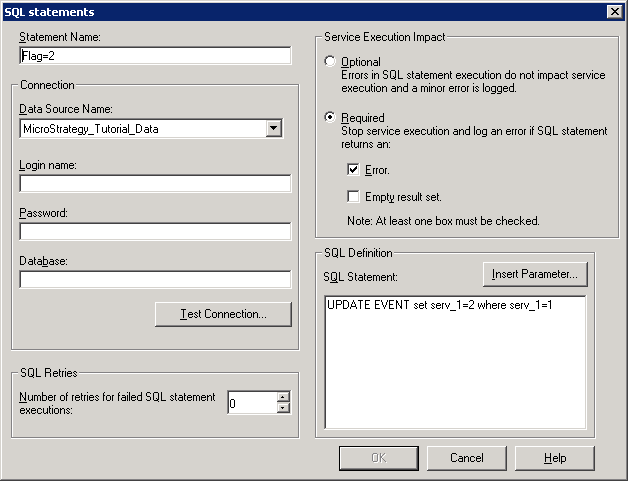
Pre-sql Flag2: Change the flag from 1 to 2, which denotes a status of service running. When the service is still executing, the first pre-sql will return a empty result set which will stop the subsequent exevuction until the service finishes.

ka04W000000Ohm8QAC_0EM440000002AlF.png


UPDATE EVENT set serv_1=2 where serv_1=1;

  
Post-sql Flag3: Reset the flag from 2 to 0, which will halt the execution of "s2"

ka04W000000Ohm8QAC_0EM440000002AlH.png


Update EVENT set serv_1=0 where serv_1=2;


Comment

0 comments

Details

Knowledge Article

Published:

April 14, 2017

Last Updated:

April 14, 2017