EducationSoftwareStrategy.com
StrategyCommunity

Knowledge Base

Product

Community

Knowledge Base

TopicsBrowse ArticlesDeveloper Zone

Product

Download SoftwareProduct DocumentationSecurity Hub

Education

Tutorial VideosSolution GalleryEducation courses

Community

GuidelinesGrandmastersEvents
x_social-icon_white.svglinkedin_social-icon_white.svg
Strategy logoCommunity

© Strategy Inc. All Rights Reserved.

LegalTerms of UsePrivacy Policy
  1. Home
  2. Topics

KB35026: The user or group 'full name' or 'login' fields are populated with the default attribute values rather than the selected ones when the user or group is imported or synchronized when using LDAP with the MicroStrategy Intelligence 9.x.


Community Admin

• Strategy


The user or group 'full name' or 'login' fields are populated with the default attribute values rather than the selected ones when the user or group is imported or synchronized when using LDAP with the MicroStrategy Intelligence 9.x.

SYMPTOM:
When synchronizing or importing users or  groups when using LDAP with the Strategy Intelligence 9.x, the user or group full name and login are populated with the LDAP DN (such as 'CN=Group Name, OU=Test,O=ExampleCorp,dc=example,dc=com') or some other attribute value (typically the default one for the LDAP server) rather than the attribute value for chosen attribute.
 
For example in the following screen shot, the group is imported with the group name to import set to use the 'CN' field, but instead the LDAP DN field is imported for the group name:

ka04W000000OdddQAC_0EM440000002DoJ.jpeg


TROUBLESHOOTING: 
For additional troubleshooting of Authentication issues, users may enable the Authentication Server -> Trace logging in the in Strategy Diagnostic and Performance tool, as shown below:
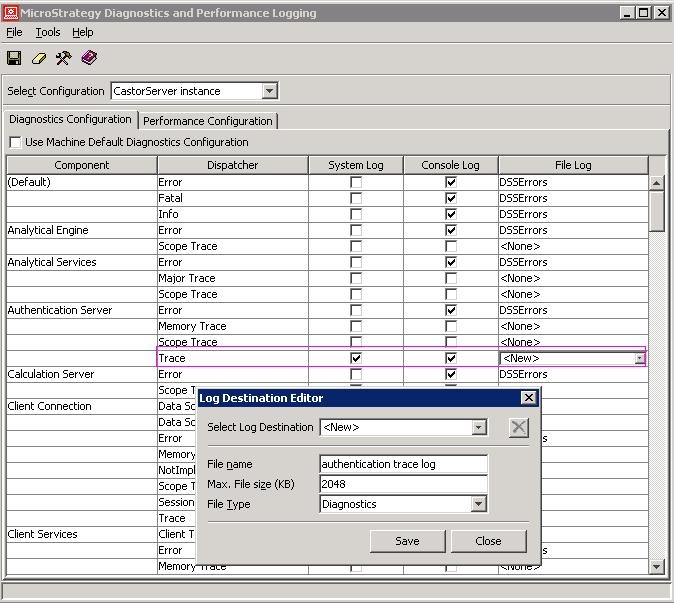
ka04W000000OdddQAC_0EM440000002DoI.jpeg

 
With this logging enabled, the following entries may be seen in DSSError.log on user login:


LDAP authentication trace: The attribute, 'sn', is not existed in this LDAP server
LDAP authentication trace: We use LDAP attribute, 'uid', for Strategy user login
LDAP authentication trace: The attribute, 'cn', is not existed in this LDAP server
LDAP authentication trace: We use LDAP attribute, 'cn', for Strategy user name
LDAP authentication trace: The attribute, 'ou', is not existed in this LDAP server
LDAP authentication trace: We use LDAP attribute, 'cn', for Strategy group name
LDAP authentication trace: do not keep authentication connection to the LDAP server

 
CAUSE:
When the Intelligence Server connects to the LDAP Server using the 'Authentication User' credentials, it attempts to check if the LDAP attributes that are chosen for import and syncronization exist on the LDAP Server for that user. If the attributes do not exist for the Authentication User (even if these do exist and are populated for other users), then the Intelligence Server will default to using the default values for the LDAP directory Server chosen in the Intelligence Server configuration.
 
The Intelligence Server performs this check using the LDAP CMP (compare) operation (for example "compare the value of the "sn" attribute with the value "abcd"). if it receives a response 'noSuchObject' (32) for the attribute whose value is being compared it considers the attribute as not available on the LDAP server.
 
ACTION:
Users experiencing this issue would need to check with their LDAP directory administrators. Either the 'Authentication User' would need to be granted those attributes, or some other change may be necessary to make these attributes visible to the Intelligence Server. 


Comment

0 comments

Details

Knowledge Article

Published:

April 10, 2017

Last Updated:

April 10, 2017