SYMPTOM:
After rotating a pie chart incorporated within a dashboard, it can be noted that the rotation setting is not applied in Flash mode. This results in a discrepancy in the display of the document in Interactive and Flash modes in Strategy Web 9.4.x-10.x.
STEPS TO REPRODUCE:
This issue can be reproduced as follows in the Tutorial project:
1) Create a report with the 'Region' attribute in the rows and the 'Revenue' metric in the columns and set this to display as a pie chart.
2) Create a document based on the above report.
3) Open the document in Interactive Mode in Strategy Web and verify the location of the pie chart:

5) View the same document in Flash view mode:
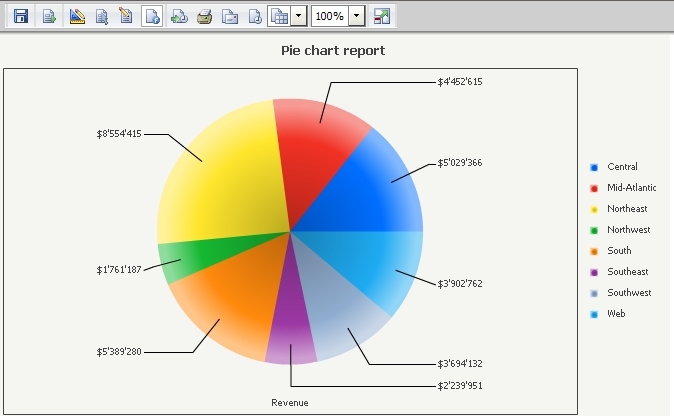
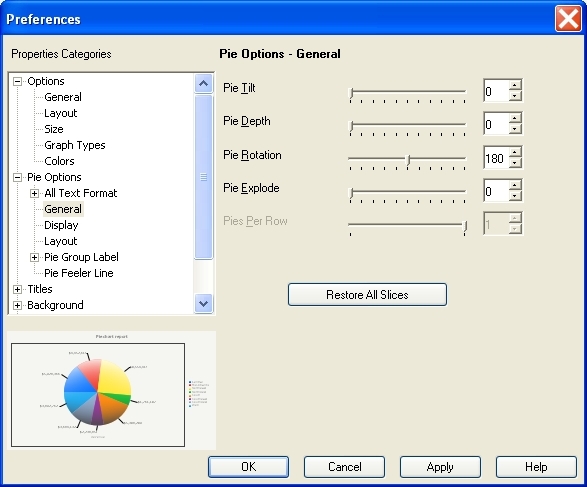
6) Open the document in Developer and set the 'Pie Rotation' to 180 degrees (Graph menu > Preferences):
7) Execute the document once more in Interactive Mode in Strategy Web and note that the pie chart has been rotated as expected:

8) View the dashboard once more in Flash mode and note that the rotation setting has not been applied:

CAUSE:
Rotating pie charts within Report Services documents is not currently supported.
ACTION:
Users wishing pie charts to rotate in Report Services documents should post to the Ideas Exchange.
