EducationSoftwareStrategy.com
StrategyCommunity

Knowledge Base

Product

Community

Knowledge Base

TopicsBrowse ArticlesDeveloper Zone

Product

Download SoftwareProduct DocumentationSecurity Hub

Education

Tutorial VideosSolution GalleryEducation courses

Community

GuidelinesGrandmastersEvents
x_social-icon_white.svglinkedin_social-icon_white.svg
Strategy logoCommunity

© Strategy Inc. All Rights Reserved.

LegalTerms of UsePrivacy Policy
  1. Home
  2. Topics

KB35073: Is there a way to display prompt answers when using an object prompt based off of pre-selected filters in a Report Services document in MicroStrategy 9.x - 10.x?


Stefan Zepeda

Salesforce Solutions Architect • Strategy


This technical note explains how to display prompt answers when using an object prompt based off of pre-selected filters in a Report Services document in MicroStrategy 9.x - 10.x

When using an object prompt consisting of pre-selected filters in a Report Services document, users often want to see the prompt selections displayed on the document.
Consider the below scenario in Strategy Tutorial:
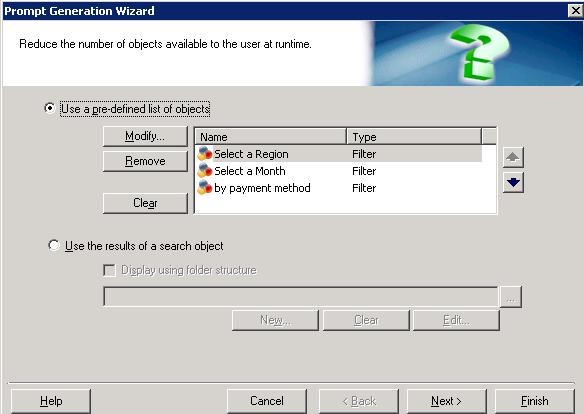
  • Create an object prompt and select a few filters.
ka02R000000kbuaQAA_0EM440000002DtL.jpeg
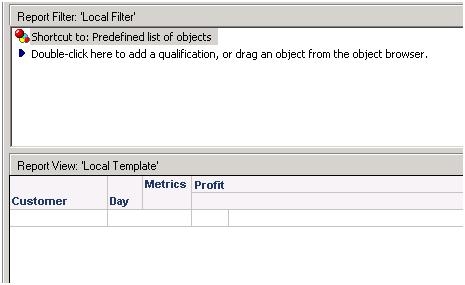
  • Create a report with Customer, Day and Profit on the template.  Add the object prompt in the Report Filter.
ka02R000000kbuaQAA_0EM440000002Dtl.jpeg
  • Add this report as a dataset in a Report Services document.
  • There are two ways to display the prompt selections for the object prompt in the document.

Method 1: Using the auto text “Prompt Details”
Edit the document and go to Insert-> Auto text-> Prompt Details.  Create the text box appropriately near the dataset.
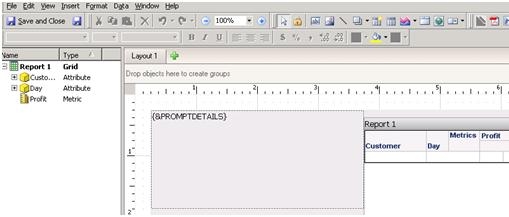
 

ka02R000000kbuaQAA_0EM440000002DtN.jpeg

  
Run the document, answer the prompts, and as seen below, where the auto-text {&PROMPTDETAILS} was, the prompt details will be displayed:
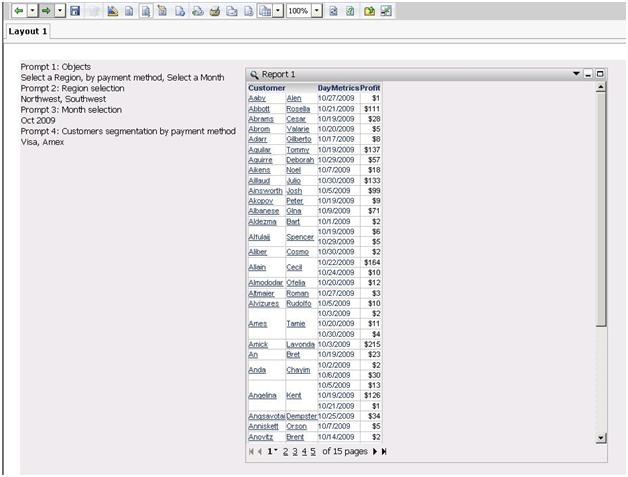
ka02R000000kbuaQAA_0EM440000002DtM.jpeg

 
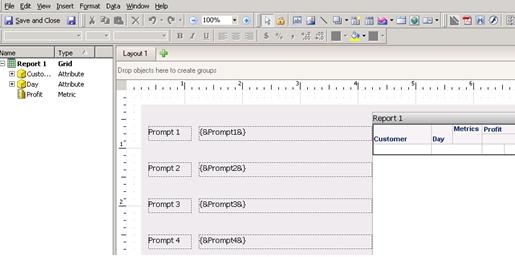
Method 2: Using Personalized Prompt Answers
Edit the document.  Depending on how many prompts are available in the dataset, create text boxes for the personalized prompt answers as shown below using the {&Promptn&} where n is the number of the prompt in the order they appeared on the prompts page:
ka02R000000kbuaQAA_0EM440000002DtP.jpeg


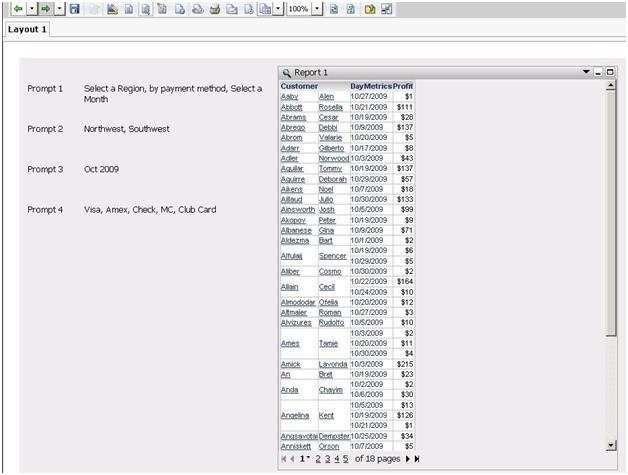
Run the document, answer the prompts, and as seen below, the prompt answers will be displayed:
ka02R000000kbuaQAA_0EM440000002DtO.jpeg


Comment

0 comments

Details

Knowledge Article

Published:

June 6, 2017

Last Updated:

June 6, 2017