EducationSoftwareStrategy.com
StrategyCommunity

Knowledge Base

Product

Community

Knowledge Base

TopicsBrowse ArticlesDeveloper Zone

Product

Download SoftwareProduct DocumentationSecurity Hub

Education

Tutorial VideosSolution GalleryEducation courses

Community

GuidelinesGrandmastersEvents
x_social-icon_white.svglinkedin_social-icon_white.svg
Strategy logoCommunity

© Strategy Inc. All Rights Reserved.

LegalTerms of UsePrivacy Policy
  1. Home
  2. Topics

KB35076: In MicroStrategy Desktop 10.x, the Unload option is grayed out when trying to unload a project


Community Admin

• Strategy


In MicroStrategy Desktop 10.x, the Unload option is grayed out when trying to unload a project

SYMPTOM:
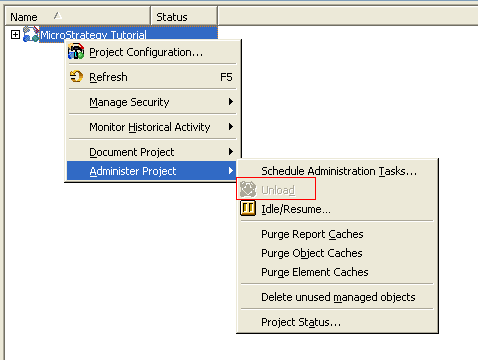
In Strategy Desktop 10.x, the 'Unload' option is grayed out when trying to unload a project (under Administration > System Administration > Project) as seen below:
 

ka04W000000Oh5aQAC_0EM440000002Akn.png

 
CAUSE:
This is happening because the user must have the correct privilege at the project level to load and unload projects.
 
ACTION:
Assign the user account the following necessary privilege by editing the user in the User Editor.
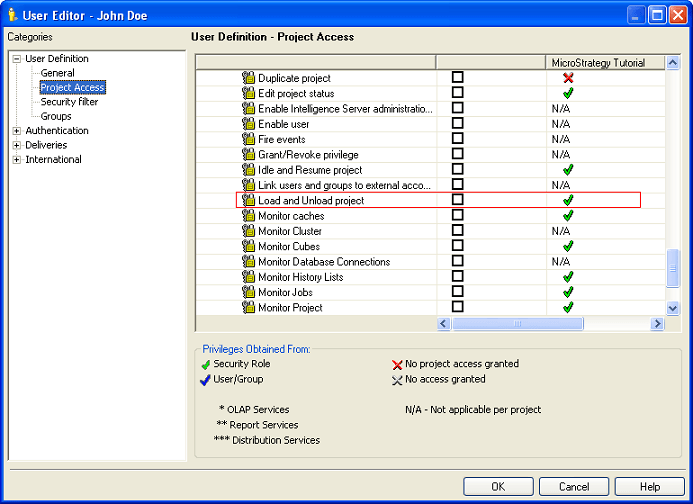
  •  Administration
    • Load and Unload project


ka04W000000Oh5aQAC_0EM440000002Akl.png

 
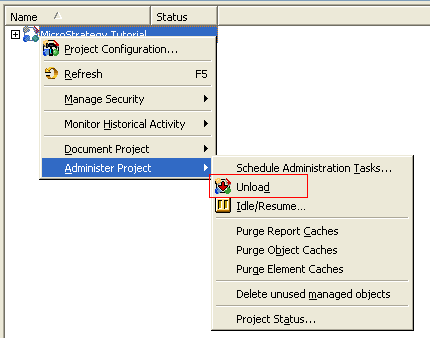
Once this privilege has been assigned, the user will be able to Load and Unload projects in Strategy Desktop under Administration > System Administration > Project.
 

ka04W000000Oh5aQAC_0EM440000002Akd.png

Comment

0 comments

Details

Knowledge Article

Published:

June 4, 2017

Last Updated:

June 4, 2017