EducationSoftwareStrategy.com
StrategyCommunity

Knowledge Base

Product

Community

Knowledge Base

TopicsBrowse ArticlesDeveloper Zone

Product

Download SoftwareProduct DocumentationSecurity Hub

Education

Tutorial VideosSolution GalleryEducation courses

Community

GuidelinesGrandmastersEvents
x_social-icon_white.svglinkedin_social-icon_white.svg
Strategy logoCommunity

© Strategy Inc. All Rights Reserved.

LegalTerms of UsePrivacy Policy
  1. Home
  2. Topics

KB35080: In MicroStrategy, when using UDB DB2 driver, `Insufficient disk space` error is displayed when publishing an Intelligent Cube.


Community Admin

• Strategy


This article describes an error that can occur when running queries against DB2

SYMPTOM:
In Strategy using UDB DB2 driver, when users execute an Intelligent Cube the below error is generated:

ka04W000000OfBiQAK_0EM440000002Dtr.jpeg

 
Error: SQL Generation CompleteQueryEngine encountered error: Execute Query failed.
Error type: Odbc error. Odbc operation attempted....Insufficient disk space.  For more information, please consult DB2 document for error code SQL01506.
 
CAUSE:
This is caused by a difference in SQL Fetch calls in ODBC 2.0 versus ODBC 3.0 calls used in Strategy and their handling by the database. 
 
ACTION:
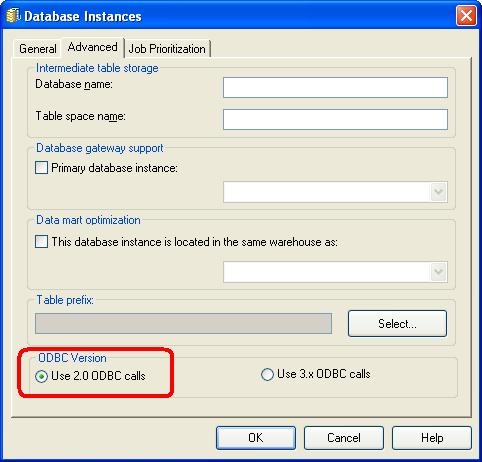
  • Go to Database Instance (for the warehouse) > Advanced > ODBC Version and switch to ‘Use 2.0
ka04W000000OfBiQAK_0EM440000002Dtc.jpeg
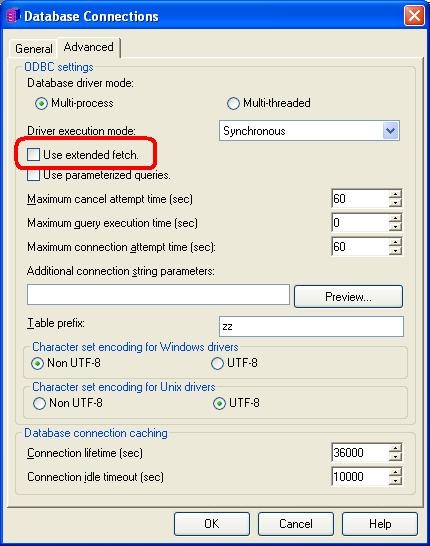
  • Make sure the ‘Use extended fetch’ box located at Database Instance -> Database Connection -> Modify-> Advanced is checked.
ka04W000000OfBiQAK_0EM440000002Dtp.jpeg
  • Restart I-Server.
  • Run the original cube which has the issue


Comment

0 comments

Details

Knowledge Article

Published:

May 11, 2017

Last Updated:

May 11, 2017