SYMPTOM:
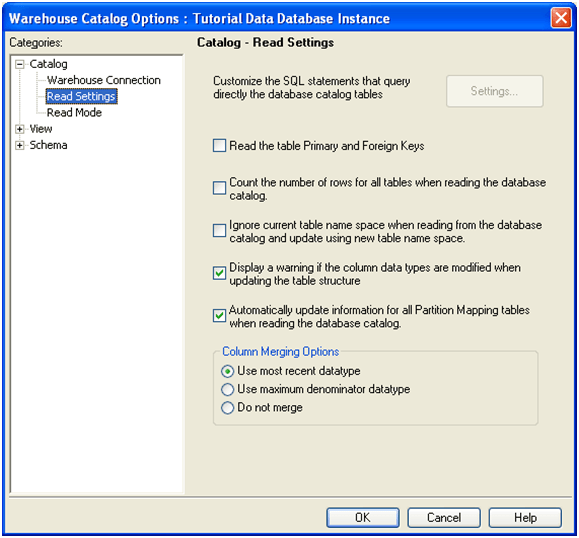
When users are trying to use the “Read the Warehouse Catalog” option, Strategy Developer hangs trying to update the screen shown below.

CAUSE:
This issue may occur when users have enabled settings that are performance intensive while reading the warehouse catalog. These settings in combination with a very large Warehouse generate a great amount of SQL increasing the time. Two of the settings are: ‘Read the table Primary and Foreign Keys’ and ‘Count the number of rows for all tables when reading the database catalog’.
ACTION:
In this case users must unchecked the first two Read Warehouse Catalog Settings. To perform this operation, go to Project Configuration > Report Definition > SQL generation > Warehouse catalog > Catalog Options.
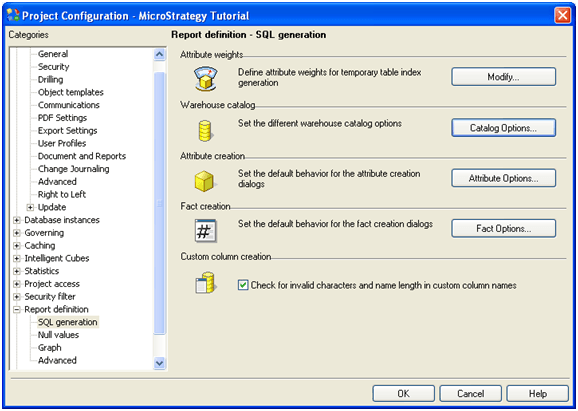
Under Catalog options > go to Read Settings > and unchecked the first two options: